Rent a Phone Number: 2026 Price Comparison (VirtualWebPhone, Google Voice, TextNow, Hushed, Burner, MySudo)

What it costs to rent a US phone number in 2026: VirtualWebPhone $20/month in crypto vs Google Voice, TextNow, Hushed, Burner and MySudo, with prices checked on official pages, renewal rules and what happens when a rental expires.

Renting a phone number costs anywhere from nothing to about $30 a month in the US. The real differences are how you pay, whether it renews by itself, and what happens to the number when you stop. This page puts the main options side by side with prices checked on each provider’s own site.

Short answer
Need a number for one month, paid without a card and with no renewal? A VirtualWebPhone private US number is $20, paid in crypto.
Want the cheapest long-term second line? Google Voice (free, needs a US mobile) or MySudo (from $1.99 a month) cost less.

Rental prices compared (checked 12 Oct 2026)

Prices are in US dollars, before tax, from each provider’s official page on the date shown. App-store prices can differ slightly from web prices. If a row says check current price, the official page did not show a number we could confirm.

OptionPrice (USD)How you payAuto-renews?What you getSource and date checked
VirtualWebPhone private number$20 per monthCrypto via NowPayments, no card or appNo. Each order is one monthNumber and private inbox link by emailvirtualwebphone.com/premium, checked 12 Oct 2026
Google Voice (personal)FreeNo payment; needs an existing US mobile to set upNot a paid planUS number in the Voice app or webGoogle Voice Help, checked 12 Oct 2026
Google Voice (Workspace)Starter and Standard: check current price. Premier: $30 per user per month, plus a Workspace planCard through Google WorkspaceYes, business subscriptionBusiness number, not reclaimed for inactivity on Starterworkspace.google.com/products/voice, checked 12 Oct 2026
TextNowFree with ads. Lock In Number $1.99 per week, Ad-Free+ $6.99 per weekApp store or in-appYes, weekly upgradesNumber in the TextNow appTextNow Upgrades page (Apr 2026), checked 12 Oct 2026
HushedUnlimited from $6.99 per month; Prepaid from $7.99 per monthCard or app storeUnlimited plans auto-renew; prepaid 30, 90 or 365 daysNumber in the Hushed apphushed.com/pricing, checked 12 Oct 2026
BurnerStandard $7.99 per month, or $47.99 per year; Premium $12.99 per monthCard or app storeYes, unless you cancelNumber in the Burner appburnerapp.com/pricing, checked 12 Oct 2026
MySudoSudoGo $1.99 per month (1 number, 30 minutes and 100 messages); SudoPro $4.99 per month (3 numbers)Card or app storeYes, monthly or annualNumber inside the MySudo appmysudo.com/pricing, checked 12 Oct 2026

Three ways rentals are billed

Fixed one-month order
You pay once for 30 days and it ends on its own. VirtualWebPhone works this way, and so does a Hushed prepaid plan. Nothing to cancel.
Auto-renewing subscription
Burner, MySudo, Hushed Unlimited and Workspace Voice charge again every month or year until you cancel. Cheaper per month, easy to forget.
Free with conditions
Google Voice needs an existing US mobile to sign up. TextNow is ad-supported and can recycle a number that goes unused unless you pay to lock it.

What happens when the rental runs out

This is the part most comparison pages skip. A rented number is never yours to keep after you stop paying.

1
VirtualWebPhone: the number stays active for the month you paid for. It does not renew. If you order again, you get a new number, not the old one.
2
Burner, Hushed Unlimited, MySudo: the plan renews until you cancel. After you cancel it stays active to the end of the period you paid for, then the number is released.
3
TextNow free tier: a number that goes unused can be reclaimed. The paid Lock In Number upgrade stops that.
4
Google Voice personal: free, but Google can reclaim numbers that sit inactive. Workspace Starter says its numbers are not reclaimed for inactivity.
Before your month ends, change the phone number on any account you want to keep. A released number can go to a stranger, who would then get your login codes.

Which rental suits which person

Pick VirtualWebPhone if you want one month, no card, no app to install, and no subscription to remember. You get the number and a private inbox link by email.
Pick Google Voice if you already have a US mobile and want a free long-term second number.
Pick MySudo or Hushed if you want a cheap line you will keep for many months and you are fine with an app and auto-renewal.
Pick Burner if you want to swap or delete numbers often and talk as well as text.
Skip all rentals for your bank, payment apps and main email recovery. Use your own mobile for anything you need to get back into years from now.

Hidden costs to check before you pay

  • App-store prices can be higher than web prices. Burner says you save 20% by subscribing online.
  • MySudo adds a payment processor fee (2.99% + $0.31 per transaction) and charges $0.99 per extra number reset.
  • Low-cost plans cap usage. MySudo SudoGo includes 30 minutes and 100 messages a month.
  • Google Workspace Voice needs a separate Workspace plan on top of the Voice price.
  • Crypto checkouts can add a small network fee depending on the coin you choose.

Renting the $20 number in four steps

1
Open the private number page and type the email where you want the number sent.
2
Continue to the NowPayments checkout and pick a coin or stablecoin.
3
Send the exact amount shown before the timer runs out.
4
Watch your email for the number and your private inbox link. Screenshots of every screen are in the buying guide.
Private US number
$20 for one month. Crypto. No auto-renewal.
Reserved for you, read in a private inbox. It is still an online number, so some apps may reject it.

Rental pricing FAQ

How much does it cost to rent a US phone number?
Anywhere from free to about $30 a month. Google Voice and TextNow have free tiers. App plans like MySudo, Hushed and Burner run from about $2 to $13 a month. A VirtualWebPhone private number is $20 for one month.
Can I rent a phone number for just one month?
Yes. A VirtualWebPhone order covers one month and never renews by itself. Hushed also sells a prepaid 30-day plan. Most app subscriptions renew until you cancel.
What happens to my rented number when I stop paying?
It goes back to the provider and can be given to someone else later. On VirtualWebPhone a new order gets a new number, so move important logins off it before the month ends.
Can I rent a number without a credit card?
Yes. VirtualWebPhone takes crypto through NowPayments. You only enter an email address. Most app-based services bill a card or your app store account.
Is renting a number better than a free one?
For a one-off code a free shared inbox is enough. Rent when you need the inbox to yourself for weeks or when shared numbers keep getting rejected.

More guides

How to get a temporary phone number · How to buy a private US phone number · Burner phone number · Receive SMS online

How to Buy a Private US Phone Number ($20/month): Step-by-Step with Screenshots

Step-by-step guide with real screenshots: open /premium, enter your email, pay $20 in crypto with NowPayments, and get your private US number and private SMS inbox link by email.

This guide walks you through buying a private US phone number on VirtualWebPhone, one screen at a time. The whole order is an email address and a crypto payment. There is no account to create. Every screenshot below is the real checkout, so you know what to expect before you click.

Short answer
Open /premium, enter your email, pay $20 in crypto on the NowPayments page, and your private US number arrives by email with a private inbox link. It is yours for 30 days.

What you get for $20

Your own US number
One US number set aside for you for 30 days. It is not listed on a public page and not shared with other visitors.
A private SMS inbox
Texts sent to your number show up on a private web page that only your link opens. The page refreshes itself every 20 seconds.
Crypto checkout
$20 per 30 days, paid through NowPayments in the coin you choose. You only give an email address. No card, no name, no sign-up.

It is built for receiving SMS verification codes: sign-ups, logins and apps that refuse the shared free numbers. It is still an online number, so each app decides whether it accepts it. If you only need a quick code for a low-stakes site, try the free temporary US numbers first.

Before you start

Have these ready: an email address you can open right now, and about $20 of crypto plus a little extra for your wallet’s own sending fee. A stablecoin such as USDT on the TRON network (TRC20) is the simplest choice, because its value stays at about $1 and network fees are usually low. If you do not own crypto yet, buy USDT on any major exchange or wallet app first, then come back.

How to buy, step by step

1
Open the private number page
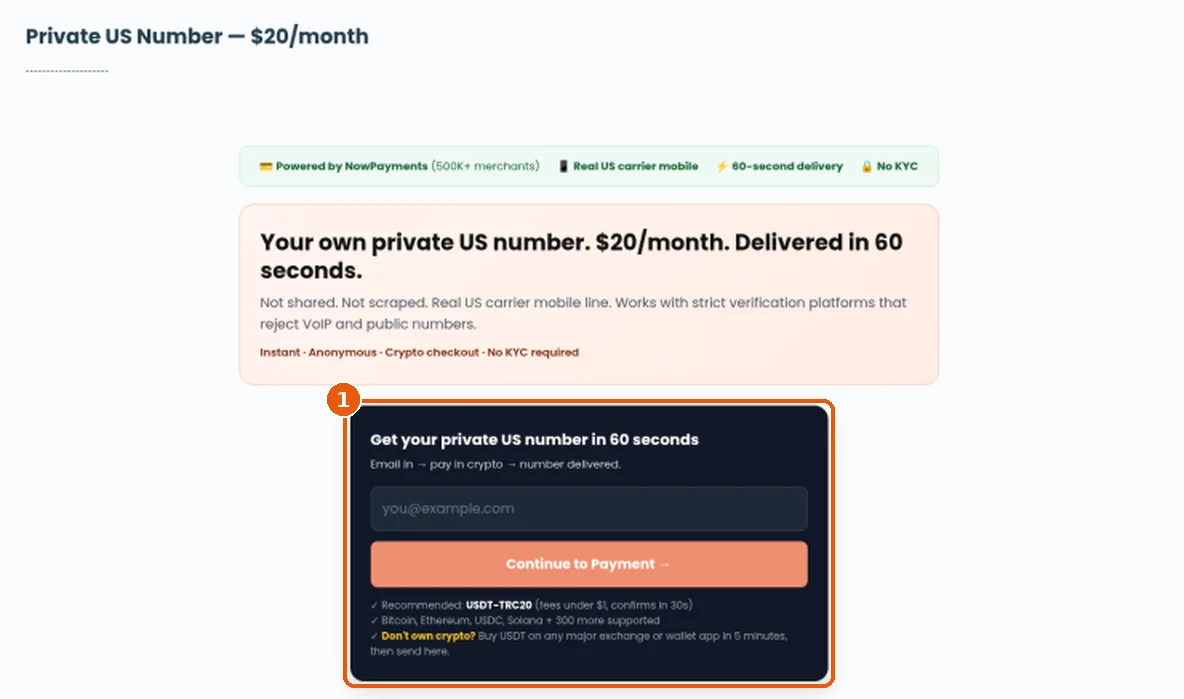
Go to virtualwebphone.com/premium. The dark order box (highlighted) is where the purchase starts. The price is $20 a month, shown at the top.
VirtualWebPhone premium page showing the Private US Number $20/month heading and the dark order box with an email field and Continue to Payment button
Step 1: the order box on /premium.
2
Enter your email
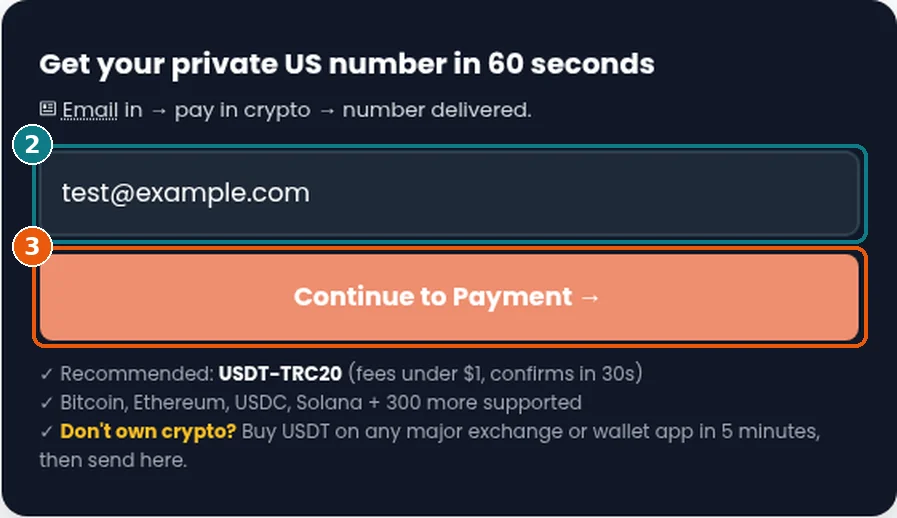
Type the email where you want the number sent (box 2 in the screenshot). Check the spelling twice. This email is the only thing on file, and it is where your number and private inbox link go.
3
Click “Continue to Payment →”
Press the orange button (box 3). The site creates your order and sends you to a secure NowPayments checkout page for $20.
Order form with test@example.com typed in the email field, highlighted as box 2, and the orange Continue to Payment button highlighted as box 3
Steps 2 and 3: email in, then Continue to Payment.
4
Pick the coin you will pay with
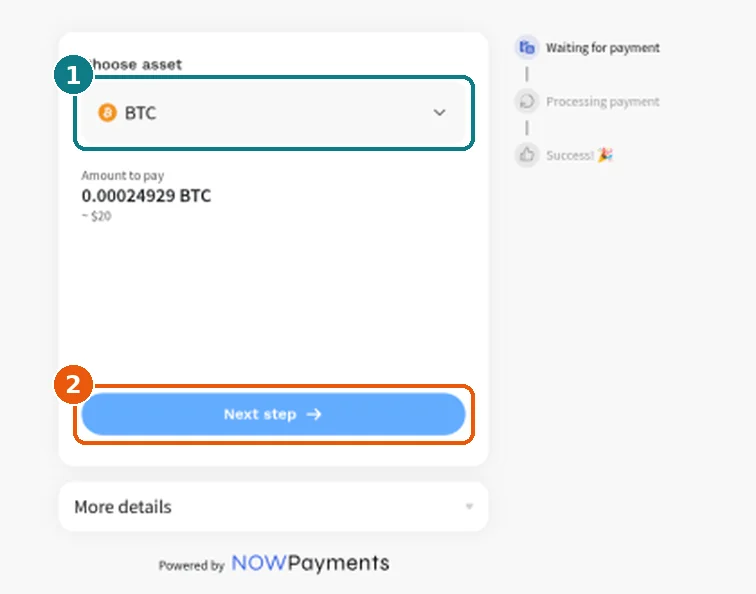
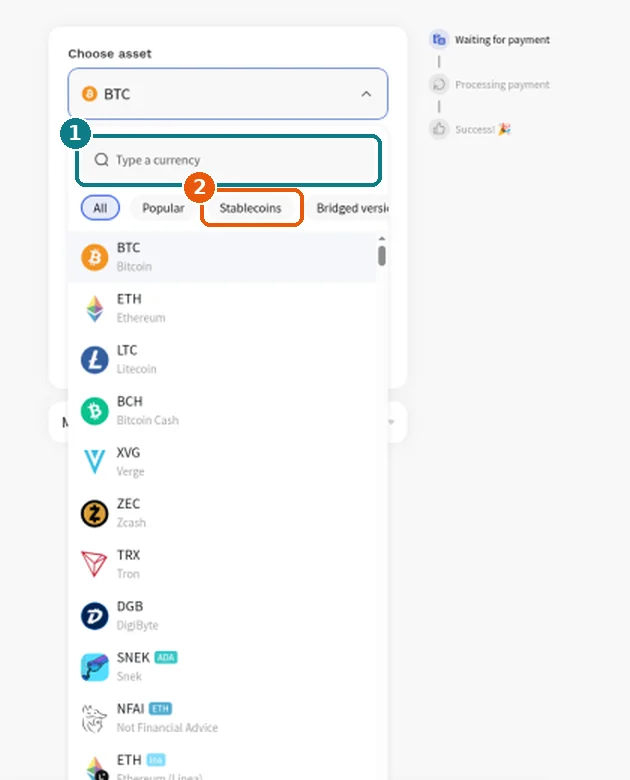
NowPayments opens with Bitcoin (BTC) selected by default and shows the amount to pay, about $20 in that coin. Click the coin dropdown (box 1) to change it. You can type a currency name in the search box, or open the Stablecoins tab. We suggest USDT on TRON (TRC20). Pick the version that matches the network your wallet or exchange will send on. Then click Next step.
NowPayments Choose asset screen with BTC selected by default, the amount to pay of about $20 in BTC, and the blue Next step button
Step 4a: the coin dropdown and the Next step button.
NowPayments currency dropdown open, showing a Type a currency search box and All, Popular and Stablecoins tabs above a list of coins
Step 4b: search for a coin, or open the Stablecoins tab.
5
Send the exact amount before the timer runs out
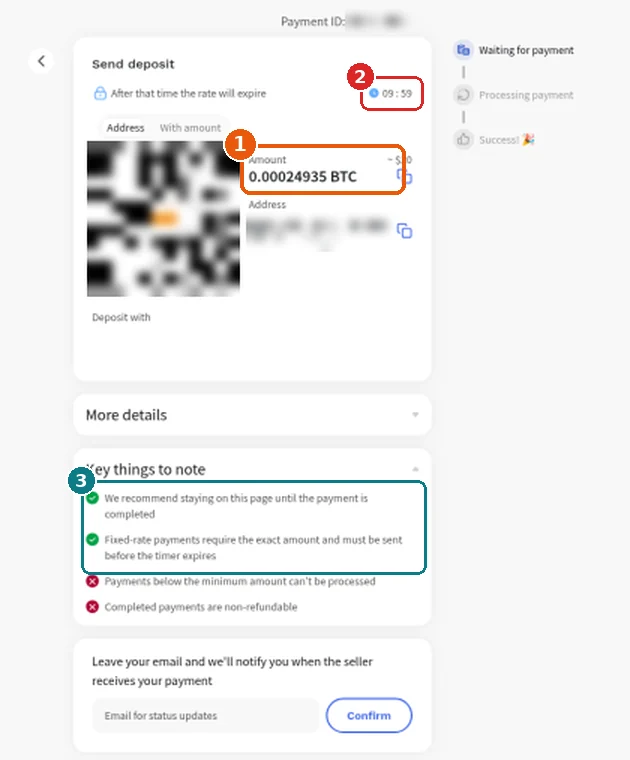
The “Send deposit” page shows a QR code, the exact amount (box 1) and a deposit address, each with a copy button. A countdown (box 2) starts at about 10 minutes. After that the rate expires. Copy the address and amount into your wallet, or scan the QR code, and send it. NowPayments’ own notes (box 3) ask you to stay on this page until the payment completes and to send the exact amount before the timer ends.
NowPayments Send deposit page with the amount highlighted, a countdown timer starting near 10 minutes, a blurred QR code and deposit address, and notes asking for the exact amount before the timer expires
Step 5: amount, timer and NowPayments’ notes. The QR code, address and payment ID are blurred here. Yours will be unique to your order.
6
Get your number
When the payment is complete, NowPayments sends you back to your private inbox page on VirtualWebPhone. While the payment is still confirming on the blockchain, that page says “Your payment is being processed”. Refresh after a minute. As soon as the payment is confirmed, your number is issued and two things happen:
On screen
Your number in large type with a Copy number button, an Active badge with days left and the expiry date, and a Messages list where your codes land.
In your email
A message from [email protected] titled “Your VirtualWebPhone Private Number: +1…” with the number, the date it is active until, and your private inbox link.

Then copy the number into the app or site that needs it, send the code, and come back to your inbox link to read it.

Keep your inbox link private. Anyone with that URL can read your messages. Bookmark it, do not post it, and do not share screenshots of it.

Tips for a smooth payment

Send the exact amount that arrives. The amount on the deposit page already includes the network fee. Exchanges often take their own withdrawal fee out of what you send. If yours does, add enough that the amount received matches the amount on screen.
Send before the timer ends. Have your wallet open before you click Next step, so you can paste and send inside the roughly 10 minutes.
Match the network. USDT exists on several networks. If you choose USDT TRC20 on the checkout, send it over TRON (TRC20) from your wallet too.
Check spam and use one email. Look in Spam or Promotions if the email is not in your inbox. Use the same email every time you order, so support can find your orders quickly.

If something goes wrong

You sent too little (underpaid). A number is only issued once NowPayments marks the payment complete. Part-payments stay pending, and NowPayments notes that payments below the minimum can’t be processed. Contact support with your email and the Payment ID shown at the top of the deposit page.
You sent on the wrong network or the wrong coin. The payment will not match your order. Do not send again. Contact support with the transaction hash from your wallet and the Payment ID.
The timer ran out. If you had not sent anything yet, go back to /premium and start a fresh order. If you sent after the timer expired, do not start a second payment. Contact support with your transaction hash first.
No email arrived. Check Spam and Promotions, and check the private inbox page you were sent back to after paying. If neither shows your number, email [email protected], or tap the chat bubble in the bottom-right corner of any page on the site.

How long it lasts and renewing

Each $20 payment covers 30 days from the moment your number is issued. Crypto cannot be charged automatically, so nothing renews on its own and you are never billed again unless you pay again. When the 30 days end, your inbox page shows Expired with a link back to /premium to order another 30 days. If keeping the same number matters to you, email support before it expires.

Private US number
$20 for 30 days, paid with crypto. No account needed.
Your own number and a private inbox, instead of a shared public page. It is still an online number, so it is not a promise that every app will accept it.

Short answers

How much does a private US number cost?
$20 for 30 days, priced in US dollars and paid in crypto through NowPayments.
Can I pay with a card or PayPal?
No. Checkout is crypto only. If you do not hold crypto, buy USDT on an exchange or wallet app and send it from there.
Which coin should I use?
A stablecoin is easiest because its price does not move while you pay. USDT on TRON (TRC20) is what the site recommends. Any coin offered on the checkout works as long as you send the exact amount on the matching network.
How fast do I get the number?
It is issued automatically as soon as NowPayments confirms your payment. How long that takes depends on the coin’s network. Fast networks like TRON usually confirm in about a minute, and Bitcoin can take longer.
Do I need to create an account?
No. You only enter an email. Your private inbox link is your access, so keep it safe.
Is the number shared with anyone?
No. Unlike the free numbers, it is not listed on a public page. Your texts only show on your private inbox link.
Does it renew automatically?
No. Each payment covers 30 days. When it expires, you can order again from /premium.
Who do I contact if something goes wrong?
Email [email protected] or use the live chat bubble in the bottom-right of the site. Include your email and the NowPayments Payment ID.

More guides

Free Virtual Phone Number: How to Get One Online and When It Fails

A free virtual phone number is a US number that lives on the internet instead of on a SIM in your pocket. You use it in a browser to get texts without handing out your personal mobile. This guide explains what that means, when a free shared inbox is enough, when it fails, and how to use one on VirtualWebPhone step by step.

On this site
Free shared US numbers in the browser, or a private number for about $20 a month (crypto).

What a free virtual phone number is

In plain words, a virtual number is a real phone number that is not tied to a handset you carry. Texts sent to it show up on a web page. You do not buy a second SIM, change your carrier plan, or install an app just to read a one-time code.

On VirtualWebPhone, the free option is a public US inbox. Anyone who opens that number’s page can see the same messages. That is why it works well for low-stakes signups and fails for anything private or long-term. A private number on this site is still online, but it is reserved for you for the month you pay, and the messages are not posted on a public page.

A free virtual number is not the same as hiding your caller ID, and it is not a promise that every app will accept it. Banks, WhatsApp, and Google often reject shared online numbers. Use your own mobile for those.

Three kinds of number

Free virtual
Shared public inbox. No cost. Anyone who opens the page can read the text. You do not keep the number.
Private virtual
Reserved for you for the month you pay. About $20, crypto. The message is not posted on a public page.
Your mobile
Stays with you. Use this for banks, WhatsApp, Google, payment apps, and anything you need to open again later.

When a free virtual number is the right tool

Use it for a one-time signup, a trial, a classifieds listing, a throwaway account, or any code you would not mind a stranger seeing. Also when you are abroad and a form will only accept a US number for a low-risk check.
Do not use a free shared number for a bank, a payment app, WhatsApp, Google, or any account you need to open again later. Those services often reject a shared line. If they do send a code, it lands on a page other people can open.

How to get a free virtual number on VirtualWebPhone

2
Pick a live US number. Use one that is receiving messages now, not an old page that redirects home.
3
Enter that number on the site that asked for a phone. Include country code 1 if the form wants it.
4
Come back to that number’s page and read the text. Codes usually show within a minute. If nothing arrives, the service blocked that number. Pick a different live number once. Do not keep retrying the same one.
5
Use the code, then stop. Do not save the public number as your recovery phone.
The free inbox is shared. Anyone who opens the same number page can read the message. Treat it like a postcard, not a locked mailbox.

Free vs private on this site

Free means a public US number page. You pay nothing, and you share the inbox with whoever else opens that page. Private means a number held for you for the month you pay. Messages stay off the public list. Both are online numbers. Neither is your personal mobile, and neither is a guarantee that every app will accept it.

If you only need one low-risk code today, start free. If you need the same number for a while, or you do not want strangers reading the inbox, use the private option.

When the free virtual number fails

Some apps check the number before they send anything. A public inbox number has often been used for that app already, so the app refuses it. You will not see a code because none was sent. That is normal for shared lines, not a bug on your side.

Private US number
About $20 a month, paid with crypto.
A private number avoids the public page, so a lot of apps that reject a shared inbox will send the code. It is still an online number. It is not your personal mobile, and it is not a promise that every app will accept it.

What to avoid

  • Do not pay a random site that claims a non-VoIP number will work on every bank and every chat app. Acceptance is up to the app.
  • Do not use a free virtual number as the only way back into an account. If you lose the inbox, you lose the account.
  • Do not post the code, or a screenshot of the inbox, anywhere public.
  • Do not keep retrying the same shared number after a block. Try a different live number once, or move to a private number.

Short answers

Can I get a free virtual phone number?
Yes. The public US numbers on VirtualWebPhone are free to read in the browser. They are shared.
Will it work for verification?
Sometimes. Low-stakes sites often accept it. Banks, WhatsApp, and Google often do not.
Do I need an app or a SIM?
No. Open the number page, enter the number on the signup form, and read the text online.
How long does a free virtual number last?
Only while that number is still listed and receiving texts. It is not a number you own.
Is free the same as private?
No. Free here means a shared public inbox. Private means a number reserved for you, at the private number page.

More guides

Receive SMS Online: Free Shared Inbox vs Private Number

To receive SMS online means you read text messages in a browser instead of on your phone. You open a US number page, someone (or a website) texts that number, and the message shows up on the screen. People use this when a form wants a phone number they do not want to share, when they are traveling and need a US line for a code, or when they are testing how a product sends texts. This guide covers receive SMS online free with a shared inbox, when that is enough, and when a private number is the better choice.

On this site
Free shared inbox for one-time texts, or a private number for about $20 a month (crypto).

What receiving SMS online actually means

In plain words, you borrow or rent a phone number that lives on the internet. Texts sent to that number appear on a web page. You do not install an app, insert a SIM, or change your carrier plan. You only need a browser and a working connection.

On VirtualWebPhone, each free US number has its own page. When a text arrives, it shows in the inbox on that page. You copy the number into a signup form, wait for the code or message, then read it online. The private option works the same way for you, except the inbox is not a public page other visitors can open.

This is different from forwarding your real phone’s texts to email, and different from a second SIM you carry. An online number is useful for short jobs. It is not a replacement for the mobile you use for banks, WhatsApp, Google, or accounts you must recover years from now.

Three ways to get texts

Free shared inbox
No cost, no signup, no app. Anyone who opens the same number page can read the text. Best for one-time, low-risk codes.
Private online number
Reserved for you for the month you pay. About $20, crypto. Messages are not posted on a public page.
Your own mobile
Stays with you. Use this for banks, WhatsApp, Google, payment apps, and anything you need to open again later.

If you only need to receive SMS online free for a throwaway signup, the shared inbox is enough. If the account matters or the code should only reach you, pay for private or use your own phone.

When receiving SMS online is a good fit

Use it for one-time codes on low-risk signups, trials, classifieds, newsletters, and forums. Also for testing your own product’s SMS flow, when you are traveling and a form will only accept a US number, and when you want to keep promotional texts off your real phone.

One-time codes you will not need again

Many sites ask for a phone just to let you create an account or download something. If losing that account tomorrow would not matter, a free shared inbox gets the code without adding your personal number to another list. See also our guide on a free phone number for verification.

Testing and development

If you build an app that sends SMS, online numbers let you confirm messages go out and land in an inbox. You do not burn your personal line for every test run.

Travel and US-only forms

Some forms refuse non-US numbers. A live US number on VirtualWebPhone can get you past that gate when you are abroad and only need the code once. Keep your real mobile for anything tied to money or identity.

Keeping spam off your real phone

Marketing and one-off signups often lead to later texts you did not want. Receiving those on a shared or private online number keeps your carrier line quieter.

When you should not receive SMS online this way

Do not use a public number for banks, payment apps, WhatsApp, Google, crypto exchanges, government portals, your main email, or any account you need later. Those services often reject shared numbers. If they do send a code, it lands on a page other people can open.

There are two separate risks. First, acceptance: banks, WhatsApp, and Google often block shared and online numbers, so the text never arrives. Second, privacy: a code on a free public page is visible to anyone refreshing that inbox. Someone else could use the same number to request a password reset later.

For accounts that hold money, identity, or long-term access, use a number only you control. Prefer your own mobile, or at least a private online number you renew while you still need it. Our SMS verification number guide goes deeper on which accounts are safe to verify online.

How to receive SMS online free on VirtualWebPhone

These five steps use the free temporary US numbers. You do not create an account and you do not install an app.

2
Pick a live US number that shows recent messages. Recent texts mean the inbox is active. Skip old pages that redirect home.
3
Enter that number on the site that asked for a phone. Choose United States (+1) as the country. Include country code 1 if the form wants the full format.
4
Come back to that number’s page and refresh after about 30 seconds. Codes usually show within a minute. If nothing arrives, the service likely blocked that number. Pick a different live number once. Do not keep retrying the same one.
5
Use the newest code that names the right service, then stop. Do not save the public number as your recovery phone on any account you plan to keep.
The free inbox is shared. Anyone who opens the same number page can read the message. Treat it like a postcard on a cafe table: fine for a throwaway code, wrong for anything private.

Want the longer walkthrough of temporary numbers themselves? See how to get a temporary phone number.

Why codes sometimes never arrive

When you try to receive SMS online and the page stays empty, the problem is usually on the sending side, not your browser.

  • The service blocks shared or online numbers. Many apps check the number before they send anything. If they refuse it, no code is ever sent, so the inbox stays blank.
  • The number has been used too often for that app. A popular free number may already be burned for WhatsApp, Google, or similar services.
  • Wrong country or format. The form must be set to +1, and every digit must match. A dropped digit sends the text somewhere else.
  • Too many resend taps. Services often pause after several requests. Wait a few minutes before trying again.
  • The code expired before you typed it. Request a fresh one and enter it right away.
  • You are looking at the wrong number page. Confirm the digits on the form match the page you have open.

A practical rule: try one other live free number. If that also fails, the service is blocking shared inboxes. A private number may succeed where a shared one does not, but no online number is guaranteed. Each app sets its own rules.

When free is not enough: a private number

Receive SMS online free works when the message is disposable. It fails when you need privacy, the same number tomorrow, or an app that rejects public inboxes. That is when a private US number makes sense.

Private US number
About $20 a month, paid with crypto.
A private number avoids the public page, so texts reach only you. A lot of apps that reject a shared inbox will send the code here. It is still an online number, not your personal mobile, and it is not a promise that every app will accept it. Stop renewing when you no longer need it.

Free shared inbox vs private number

Both let you receive SMS online in a browser. The difference is who can read the message and whether you keep the number.

 
Free shared
Private
Cost
Free
About $20 a month
Who can see texts
Anyone on the page
Only you
Payment
None
Crypto
Same number later
Not guaranteed
For the month you pay
Best for
One-time low-risk codes
Accounts you want to keep private

If you are comparing this to a disposable or burner-style line, read burner phone number: how to get one free and when to go private.

What to avoid

  • Do not use a free shared inbox for a bank, payment app, WhatsApp, Google, or your main email. Those services often reject shared numbers, and a public code is unsafe.
  • Do not leave a public number as the only recovery phone on an account you care about. If you lose the inbox, you lose the account.
  • Do not pay a random site that claims a non-VoIP number will work on every bank and every chat app. Acceptance is up to the app.
  • Do not hammer resend on one number. It can pause the line for everyone and lock you out for a while.
  • Do not post the code, or a screenshot of the inbox, in public chats or forums.
  • Do not use online numbers to create fake accounts, dodge bans, run scams, or break a site’s rules. Use them legally and the way the site allows.

More guides

Receive SMS online: short answers

Can I receive SMS online free?
Yes. The public US numbers on VirtualWebPhone are free to open and read. They are shared, so treat codes as public.
Do I need an app?
No. A browser is enough for both the free inbox and the private number pages.
Will banks, WhatsApp, or Google work?
Often no. Banks, WhatsApp, and Google often reject shared numbers. Use your own mobile for those accounts.
How long until the text shows?
Usually within a minute. Refresh the number page after about 30 seconds. If nothing arrives, try one other live number once.
Is the free inbox private?
No. Anyone who opens the same number page can read the same messages. Use a private number if only you should see the text.
How much is a private number?
About $20 a month, paid with crypto, on the private number page.
Can I keep the same number?
Free shared numbers are not yours to keep. A private number stays with you for the month you pay. Renew while you still need it.

SMS Verification Number: How to Get Codes Online Safely

An SMS verification number is the phone number you give a website or app so it can text you a one-time code. You type that code back in, and the site treats your number as confirmed. If you do not want to hand your personal mobile to every sign-up form, you can use an online number instead. This guide explains how SMS verification works, which accounts are safe to verify with an online number, why codes sometimes never show up, and how to receive a code on VirtualWebPhone step by step.

SMS verification numbers on this site
Use a free shared US number for one-time codes on low-risk sites. Use a private number when the code should only reach you.

What an SMS verification number is

SMS verification is the step where a service sends a short code, usually four to eight digits, to the number you entered. The code proves that you can receive texts at that number right now. Sites use it to slow down fake sign-ups, to confirm a new account, and sometimes as a second step when you log in.

Any number that can receive a text can, in principle, be an SMS verification number. In practice there are three kinds: the mobile number from your phone carrier, a private online number that only you can read, and a free shared online number whose inbox is public. They all receive texts, but services treat them differently, and the risk to you is very different too.

On VirtualWebPhone, each free US number has its own page. Every text sent to that number appears on the page, and anyone who opens it can see the same messages. The private number is held for you for the month you pay, and its texts are not posted publicly. Both are online numbers, not a SIM card in your phone.

Three numbers you can verify with

Free shared number
No cost, no signup, no app. The inbox is public, so only use it for a code that would not matter if a stranger saw it.

Private online number
A US number kept for you for the month, about $20, paid with crypto. Codes are not shown on a public page.

Your own mobile
The right choice for banks, payment apps, WhatsApp, Google, your main email, and anything you must recover later.

How SMS verification works behind the scenes

Knowing what happens after you press “Send code” explains most failures. The process usually looks like this:

  • The service checks the number. Many services look up what kind of number you entered before they send anything. Some refuse online or shared numbers at this point, and you may see an error such as “this number is not supported”, or nothing at all.
  • The code is sent. The text travels through an SMS provider to the number. This normally takes a few seconds, but it can take a minute or two.
  • The code expires. Most codes are only valid for a short time, often a few minutes. An old code will be rejected even if you type it correctly.
  • The number is remembered. Many services link the number to your account. They may use it again for login checks or password resets, which is why the number you choose matters long after the first code.

When an online SMS verification number works

Good fits: accounts you can afford to lose, where the phone number is only a gate at sign-up. If someone else seeing the code, or you losing the number next month, would not hurt you, an online number is a reasonable choice.

Forums, newsletters, and trial accounts

Plenty of sites ask for a number just to let you post, download, or try a feature. A free shared number gets you past the form without adding your real number to another marketing list.

Testing your own app or website

If you build a product that sends text codes, a few online numbers let you check that messages go out and arrive, without using your personal phone for every test.

Short-term accounts you will use privately

For an account you will keep for a few weeks, such as a booking, a marketplace profile, or a side project, a private number is the better pick. The code reaches only you, and you can keep the number for the month you pay.

When it fails, and when you should not try

Poor fits: banks, payment and money apps, WhatsApp, Google accounts, your main email, crypto exchanges, government and tax portals, and anything tied to your identity or money. Banks, WhatsApp, and Google often reject shared numbers. Even if a code does arrive on a free number, anyone viewing that page could use it.

There are two separate problems here. The first is acceptance: many larger services block online and shared numbers, so the code is never sent. The second is safety: if a code for an important account does get through on a public page, a stranger could use the same number to request a password reset later. For accounts that matter, use a number that only you control, ideally your own mobile.

If you live outside the US but keep US bank or tax accounts, an online number is usually not the answer for those logins. Ask the bank which numbers and sign-in methods it supports, such as an authenticator app, and keep a number you will control for years.

How to receive an SMS verification code on VirtualWebPhone

1
Decide how much the account matters. Throwaway account: free number. Account you will keep or that holds anything personal: private number or your own phone.
2
Open the free temporary US phone numbers and pick one that shows recent messages. Recent texts mean the number is live.
3
Copy the number exactly and choose United States (+1) as the country on the sign-up form. A wrong country code is one of the most common reasons a code goes nowhere.
4
Press “Send code” once, then go back to the number’s page and refresh after about 30 seconds. Look for a message that names the service you are signing up for.
5
Enter the newest code quickly, before it expires. If several codes are showing, use the latest one with the right service name, since other people may be using the same number.
6
Once you are in, open the account settings and switch the phone number to one you control, or add an authenticator app, if you plan to keep the account.
Tip: keep the sign-up tab and the number’s page open side by side. Codes often expire within minutes, and switching quickly makes a real difference.

Why the verification code never arrives

  • The service blocks online numbers. This is the most common cause. If it refuses one free number, it will usually refuse the others too.
  • The number has been used too often. Services may stop sending to a number that many people have already used to sign up.
  • Wrong country or format. Check that the form is set to +1 and that no digit was dropped when you pasted.
  • You pressed resend too many times. Many services pause sending after several requests. Wait a few minutes before trying again.
  • The code arrived, but expired. Request a fresh code and enter it right away.

A sensible rule: try one other live number. If that also fails, the service is blocking shared numbers. A private number may work where a shared one does not, but no number is guaranteed to be accepted, because each service sets its own rules.

Free vs private SMS verification number

 
Free shared
Private
Cost
Free
About $20 a month
Who can see codes
Anyone on the page
Only you
Payment
None
Crypto
Same number later
Not guaranteed
For the month you pay
Best for
One-time codes on low-risk sites
Accounts you want to keep private
Private US verification number
About $20 a month, paid with crypto.
Your private number is not listed on a public page or shared with other visitors, so verification codes reach only you. Some services that turn away a shared number will accept it. It is still an online number, not a carrier mobile line, so no app is guaranteed to accept it. Stop renewing when you no longer need it.

What to avoid

  • Do not verify a bank, payment app, WhatsApp, Google, or your main email with a free shared number.
  • Do not leave a shared number as the recovery or two-step login phone on any account you plan to keep. Whoever opens that page later could receive your reset code.
  • Do not request codes over and over. It can get the number paused for everyone and lock you out for a while.
  • Do not believe anyone who promises a number will work on every app. Each service decides which numbers it accepts.
  • Do not use verification numbers to create fake accounts, dodge bans, run scams, or break a site’s rules. Use them legally and the way the site allows.
  • Do not share codes or screenshots of the inbox in public chats or forums.

More guides

SMS verification number: short answers

Can I get a free SMS verification number?
Yes. The public US numbers on VirtualWebPhone are free and need no signup. They are shared, so anyone can see the codes.
Will it work for any app?
No. Each app decides which numbers it accepts. Banks, WhatsApp, and Google often reject shared numbers.
How long does a code take to arrive?
Usually seconds, sometimes a minute or two. Refresh the number’s page after about 30 seconds.
Why does the site say my number is not supported?
The site checked the number type and refuses online or shared numbers. Use a different number type, or your own phone.
Is it safe to use a shared number for verification?
Only for accounts you can afford to lose. Never for money, identity, or your main email.
Can I receive a code again later on the same number?
Free numbers can leave the list at any time. A private number is yours for each month you pay.
How much is a private verification number?
About $20 a month, paid with crypto, on the private number page.
Is using an online number for verification legal?
Using a second number for privacy is legal and common. Using it for fraud, fake accounts, or ban evasion is not, and it often breaks a site’s terms.

Burner Phone Number: How to Get One Free and When to Go Private

What a burner phone number is, when it works, when it fails, and how to get a free or private US burner number online in a few steps.

A burner phone number is a second number you give out instead of your real one, then drop when you no longer need it. People use one to sign up for a site, list something for sale, talk to a new match, or get a one-time code without letting a stranger or a company keep their personal mobile. This guide explains what a burner number really is, where it helps, where it breaks, and how to use a free or private US number on VirtualWebPhone the right way.

Burner numbers on this site
Grab a free shared US number for quick, low-risk texts. Choose a private number when the messages should stay yours.

What a burner phone number means

The name comes from the “burner phone”: a cheap prepaid handset that someone uses for a while and then throws away. A burner phone number keeps the same idea but skips the extra device. It is simply a number that is not your main line. You hand it out where you do not want to share your real number, and you stop using it when the job is done.

Today most burner numbers live online. Instead of a SIM card in a drawer, you read the texts in a web browser. That makes them fast to get and easy to walk away from. It also means they behave differently from a normal mobile number, and that difference matters when an app decides whether to send you a code.

On VirtualWebPhone there are two kinds. The free numbers are public inboxes: every number has its own page, and each text sent to that number appears on the page for anyone to read. The private number is reserved for you for the month you pay, and its messages are not posted on a public page. Both are online numbers. Neither one replaces the mobile number you use for your bank or your family.

Three ways to keep your real number private

Free burner number
A shared public inbox. No cost, no account, no download. Anyone who opens the page can read the same texts, so use it only for messages you do not mind strangers seeing.

Private burner number
A US number held for you for the month you pay, about $20, paid with crypto. Texts are not shown on a public page. Let it lapse when you are done.

Your real mobile
Keep it for banks, payment apps, WhatsApp, Google, your main email, and anything you will need to log back into months from now.

When a burner phone number works well

Good fits: short-term contact with people or companies you do not fully trust yet, and one-time codes for accounts with nothing valuable in them. The common thread is that losing the number later would not hurt you.

Sign-ups and free trials

Many sites ask for a phone number before they let you read an article, download a file, claim a coupon, or start a trial. Often they just want a way to send marketing texts. A burner number gets you through the form without adding your real number to another mailing list. If the site later sells or leaks its contact list, your personal phone is not on it.

Marketplace and classifieds listings

When you sell a couch or a used bike, your number ends up in front of a lot of strangers. Some are real buyers. Others are spammers or people trying a scam. A burner number puts a layer between them and your real phone. Once the item is gone, you stop checking the number and the messages stop reaching you. For listings where buyers will text you back and forth, a private number is the better pick, because on a free shared number those replies would sit on a public page.

Online dating

Moving a chat off a dating app usually means swapping numbers. Until you have met someone and feel comfortable, a separate number lets you keep talking without handing over the line that is linked to your name, your other accounts, and your home address in some public records. Use a private number here, not a free one. Personal conversations should never land on a page other people can open.

Deliveries, pickups, and bookings

Restaurants, salons, delivery forms, and one-off contractors often require a phone number for a single update. A burner number covers that one message and keeps you off their long-term contact list. Pick a number you will still be able to check on the day the update is sent.

One-off verification codes

Some forums, test accounts, and low-stakes apps send a single text code to prove you are a real person. If you will never need to recover that account by phone, a free burner number can receive the code. Our guide to using a free phone number for verification covers this case in more detail.

Keeping your real number off the internet

Every form you fill in is one more place your number can leak from. Using a burner number for low-value sites keeps your real number in fewer databases, which can mean fewer spam calls and fewer scam texts over time. It is also handy if you live or travel outside the US and a form will only accept a US number.

When a burner number fails

Poor fits: banks, payment and money apps, WhatsApp, Google accounts, your main email, crypto exchanges, government services, and any account tied to your identity or money. Banks, WhatsApp, and Google often reject shared numbers outright. Even when a code does arrive, on a free number it sits on a page anyone can open.

A burner number can fail in a few different ways, and it helps to know which one you are facing:

  • The app checks the number first. Many services look up what kind of number you entered before they send a text. If it looks like an online or shared number, they quietly refuse. No code is sent, so none can arrive.
  • The number is overused. Free public numbers are used by many visitors for the same popular apps. After enough sign-ups, an app may stop accepting that number for good.
  • You need the number again later. Free numbers come and go from the list. If an account asks for a new code next month and the number is gone, you may be locked out.
  • You need to make calls or keep a long conversation. The free numbers are built for receiving texts on a web page. They are not a full replacement phone line.
  • You pressed resend too many times. Repeated requests can trigger a rate limit that blocks the attempt for a while.

If one free number does not get the code, try one other live number, once. If that fails too, the service is screening shared numbers and more free numbers will not help. Switch to a private number, or use your own phone for that service.

How to use a burner phone number on VirtualWebPhone

1
Go to the free temporary US phone numbers. No signup or app is needed.
2
Pick a number that shows recent messages. Fresh activity tells you the number is live and still receiving texts.
3
Copy the number into the form that asked for a phone. If there is a separate country box, choose United States (+1) and type the remaining ten digits.
4
Ask the site to send the text. Then return to that number’s page on VirtualWebPhone and refresh the inbox.
5
Find the message from the service you just used. Check the sender and the time so you do not copy an older code meant for someone else. Enter it quickly, since most codes expire within minutes.
6
Once you are in, open the account settings and swap the burner number for an email address or a number you control. That way nobody else can use the shared number to reset your password.
A free burner number is a public inbox. Everyone who opens the same page sees the same messages at the same moment. Treat anything sent there like writing on a postcard.

Free vs private burner number

The free numbers are great for speed and zero cost. The trade-off is privacy and control. A private number fixes the privacy problem and lets you keep the same number for the whole month, which matters for listings, dating, and anything that needs more than one message.

 
Free shared
Private
Cost
Free
About $20 a month
Who can read texts
Anyone on the page
Only you
Payment
None
Crypto
Same number later
Not guaranteed
For the month you pay
Best for
One-time, low-risk texts
Listings, dating, private codes
Private US burner number
About $20 a month, paid with crypto.
Your private number is not listed on a public page and is not shared with other visitors, so your messages stay yours. Some apps that turn away a shared inbox will accept it. It is still an online number, not a carrier mobile line, and no app is guaranteed to accept it. When you are finished, simply stop renewing.

Is a burner phone number legal, and can it be traced?

Legal for normal privacy

In the US, having a second number to protect your privacy is ordinary and widely done. People keep separate numbers for work, side businesses, online selling, and dating. What makes something illegal is what you do with the number, not the number itself. Using any phone to harass, threaten, scam, or impersonate someone is illegal no matter whose number it is. Rules for phones and prepaid lines can change, so check current rules if you are unsure.

Private from strangers, not invisible

A burner number hides your real number from the people and sites you give it to. It does not make you anonymous. The website you sign up on, the service that sends the text, and the provider behind the number can all keep their own records, such as your connection details. Those records can be requested through legal channels. Think of a burner number as a privacy tool for everyday life, not a way to avoid responsibility.

What to avoid

  • Do not use a free shared number for a bank, a payment app, WhatsApp, Google, your main email, or any account with money or personal data in it.
  • Do not leave a burner number as your recovery or two-step login phone. Whoever opens that page later could receive your reset code.
  • Do not have private conversations, such as dating chats or buyer details, on a free number. Use a private number for anything personal.
  • Do not trust any seller who promises a number will work on every app. Each app decides for itself which numbers it accepts.
  • Do not use a burner number to harass anyone, run scams, impersonate a person or business, create fake accounts, dodge a ban, or break a site’s rules. Use it legally and ethically, the same way you would use your own phone.
  • Do not post codes or screenshots of the inbox in public chats or forums.
Tip: decide before you start how long you need the number. A single code needs only a free number. A week of messages from buyers or a new match calls for a private number you can keep for the month.

More guides

Burner phone number: short answers

Can I get a free burner phone number?
Yes. The public US numbers on VirtualWebPhone are free and need no signup. They are shared, so anyone can read the texts.
Is a burner number the same as a temporary number?
Mostly. Both mean a number you use for a while instead of your own. “Burner” stresses that you drop it when you are done.
Can I use a burner number for verification?
For low-stakes sites, often yes. Banks, WhatsApp, and Google often reject shared numbers, so use your own phone for those.
Are burner phone numbers legal?
Using a second number for privacy is legal and common. Using any number for harassment, fraud, or impersonation is not.
Are burner numbers traceable?
They keep your real number from strangers, but they are not anonymous. Sites and providers can keep records that may be requested through legal channels.
How much does a burner number cost?
The shared numbers here are free. A private number is about $20 a month, paid with crypto.
Why did my code never arrive?
Usually the app refused to send to that number. Try one other live number. If that fails, the app is blocking shared numbers.
Can I keep the same burner number?
Free numbers can disappear from the list at any time. A private number on the private number page is yours for each month you pay.

Free Phone Number for Verification: How It Works and When It Fails

A free phone number for verification is a US number you can type into a signup form to receive a one-time text code, without handing over your own mobile. It works well for quick, low-risk signups. It often fails for banks, WhatsApp, Google, and other apps that check the number before they send anything. This guide explains both sides, so you know which number to use before you start.

Verification codes on this site
Try a free shared US number first. Move to a private number if the code never arrives.

What “free number for verification” really means

When a website asks for your phone, it usually sends a short code by text. You type the code back in to prove the number is real and that you can read it. A free verification number is simply a number whose texts you can read online. On VirtualWebPhone, the free numbers are public inboxes: each number has its own page, and every text sent to it shows up there.

That one fact decides almost everything. Because the inbox is public, the number is free and needs no signup. Because the inbox is public, other people can read the same code, and many apps already know the number is shared.

Your three options

Free shared number
No cost and no account. The code appears on a public page. Best for throwaway signups where nothing important is at stake.

Private number
Reserved for you for the month you pay, about $20, paid with crypto. Your codes are not shown on a public page.

Your own mobile
The right choice for money, messaging, email, and any account you will need to recover later.

When a free number works, and when it does not

Good fits: a free trial, a newsletter or forum signup, a coupon or giveaway form, testing your own app’s text messages, a classifieds listing, or a site that will only accept a US number while you are abroad. In each case, a stranger seeing the code does little harm.
Poor fits: banks, payment and money apps, WhatsApp, Google accounts, email accounts, crypto exchanges, and anything tied to your identity. These services often reject shared numbers outright. Even when one does send a code, the code sits on a page other people can open, and you cannot get it back later if you need to log in again.

How to get a verification code with a free number

1
Open the free temporary US numbers on VirtualWebPhone.
2
Choose a number that shows recent messages. Fresh activity means the number is live and still receiving texts.
3
Copy the number into the signup form. If the form has a separate country box, pick United States (+1) and enter the remaining ten digits.
4
Tap “Send code”, then go back to that number’s page on VirtualWebPhone and refresh it. Look for the message from the service you just used, and check the time so you do not grab someone else’s older code.
5
Type the code in quickly. Most codes expire within minutes.
6
Once you are in, go to the account’s security settings and replace the shared number with an email address or your own phone, so nobody else can use that number to get into your account.
Remember that the inbox is public. Anyone who opens the same number page sees the same code at the same time. Use it for signups you would be fine losing.

Why the code sometimes never arrives

If you wait a couple of minutes and nothing shows up, the problem is almost never your typing. The usual reasons are:

  • The app blocked the number. Many services check whether a number is an online or shared number before they send a text. If it is, they refuse quietly, so no message is ever sent.
  • The number has been used too often. Public numbers get used by many people for the same popular apps. After enough signups, an app may stop accepting that number.
  • The app only sends to certain countries. Some services limit which country codes they send codes to.
  • You hit a rate limit. Pressing “Resend” again and again can lock the attempt for a while.

The fix is to try one other live number, once. If that also fails, the app is screening shared numbers, and more free numbers will not help. Switch to a private number, or use your own phone for that service.

Private US number
About $20 a month, paid with crypto.
A private number is not listed on a public page and is not shared with other visitors, so your verification codes stay yours. Some apps that refuse a shared inbox will accept it. It is still an online number, not a mobile line from a carrier, and no app is guaranteed to accept it.

Free vs private, side by side

Free shared
Private
Cost
Free
About $20 a month
Who can see texts
Anyone on the page
Only you
Payment
None
Crypto
Kept for you
No
For the month you pay
Best for
One-time, low-risk codes
Codes you want kept private

What to avoid

  • Do not use a free shared number for a bank, a payment app, your main email, or any account with money or personal data in it.
  • Do not leave a shared number as your recovery or two-step login phone. Anyone who opens that page later could receive your reset code.
  • Do not trust any seller who promises a number will work on every app. Each app decides for itself which numbers to accept.
  • Do not use any number to break a site’s rules, create fake accounts, or get around a ban.
  • Do not share screenshots of the inbox or codes in public chats.
Tip: if a site lets you verify with email instead of a phone, that is often the simplest private option. Keep the free number for sites that insist on a US phone.

More guides

Short answers

Is there really a free phone number for verification?
Yes. The public US numbers on VirtualWebPhone are free to use and need no signup. They are shared with everyone who visits the page.
Will it work for WhatsApp, Google, or my bank?
Often not. These services commonly reject shared numbers. Use your own phone for them.
Why did I not get the code?
Usually the app refused to send to that number. Try one other live number. If that fails too, the app is blocking shared numbers.
Can someone else see my code?
On a free number, yes. Anyone who opens that number’s page can read it. A private number keeps your texts off public pages.
Can I use the same number again later?
Only while it is still listed. Free numbers come and go, so do not rely on one for future logins.
What does the private number cost?
About $20 a month, paid with crypto, on the private number page.

How to Get a Temporary Phone Number

A temporary phone number is a US number you use for a short time instead of your real mobile. You want a text code without tying that site to your personal line.

On this site
Free shared inbox, or a private number for $20 a month.

Three kinds of number

Temporary
Shared public inbox. Free. Anyone who opens the page can read the text. You do not keep the number.

Private
Reserved for you for the month you pay. About $20, crypto. The message is not posted on a public page.

Your mobile
Stays with you. Use this for banks, WhatsApp, Google, and anything you need to open again later.

When it is the right tool

Use it for a one-time signup, a trial, a classifieds listing, or any code you would not mind a stranger seeing. Also when you are traveling and a form will only accept a US number.
Do not use a public number for a bank, a payment app, WhatsApp, Google, or any account you need to open again later. Those services often reject a shared line. If they do send a code, it lands on a page other people can open.

How to get one

2
Pick a live US number. Use one that is receiving messages now, not an old page that redirects home.
3
Enter that number on the site that asked for a phone. Include country code 1 if the form wants it.
4
Come back to that number’s page and read the text. Codes usually show within a minute. If nothing arrives, the service blocked that number. Pick a different live number once. Do not keep retrying the same one.
5
Use the code, then stop. Do not save the public number as your recovery phone.
The free inbox is shared. Anyone who opens the same number page can read the message. Treat it like a postcard.

When the free number fails

Some apps check the number before they send anything. A public inbox number has usually been used for that app already, so the app refuses it. You will not see a code because none was sent.

Private US number
About $20 a month, paid with crypto.
A private number avoids the public page, so a lot of apps that reject a shared inbox will send the code. It is still an online number. It is not your personal mobile, and it is not a promise that every app will accept it.

Online, VoIP and app questions

“Online phone number” just means the number is hosted on the web instead of on a SIM. You open a page and read the texts there, with no app download or handset. To the site sending the code it still looks like a normal US number.

Online is not the same as non-VoIP. Web-hosted numbers, free or private, are usually flagged as VoIP. Some apps check that before sending anything, so treat no online number as guaranteed on every service.

What to avoid

  • Do not pay a random site that claims a non-VoIP number will work on every bank and every chat app. Acceptance is up to the app.
  • Do not use a temporary number as the only way back into an account. If you lose the inbox, you lose the account.
  • Do not post the code, or a screenshot of the inbox, anywhere public.

Short answers

Can I get a temporary US number for free?
Yes. The public numbers on VirtualWebPhone are free to read. They are shared.
Will it work for verification?
Sometimes. Low-stakes sites often accept it. Banks, WhatsApp, and Google often do not.
How long does it last?
Only while that number is still listed and receiving texts. It is not a number you own.
Is a temporary number the same as a private number?
No. Temporary here means a shared public inbox. Private means a number reserved for you, at the private number page.
Do I need an app to read the texts?
No. Open the number page, enter the number on the signup form, and read the text on that same page.

How to Get Free USA Phone Number for receive SMS online?

Are you looking for free USA phone number for mobile verification or any other purpose? It is now easy to do. You can easily find various virtual USA mobile numbers to do your important tasks. Doing this will help you to stay away from spam SMS which you will get whenever you feed your numbers for the registration.

Also, your personal number will be fully safe and secure. You can use this number for doing any type of work on any website. There are some websites, which allow only USA mobile numbers while the registration. So, at that time, if you do not have the one, you will not get access to that platform.

So, we are here to help you to get the free USA phone numbers using simple methods and platforms. These platforms are fully tested and trusted for providing the best free phone number services to the users. So, let’s have a look at the ways to get those phone numbers easily.

Get a free USA Mobile number Online?

Free Temp SMS is one of the greatest ways to get free USA phone numbers easily without paying anything to anyone. You will have access to not the only the USA but the numbers for different countries including Canada etc. The platform is easy to use. Also, the latest numbers keep updating on the platform. There is a 100% guarantee that these numbers will work for sure. Once you are on this website, you do not have to wander here and there in search of free phone numbers. These numbers will allow you to receive any type of SMS including OTP and verification SMS. So, in this way, FreeTempSMS becomes the best options to get these free mobile number on quickest and reliable ways.