How to Buy a Private US Phone Number ($20/month): Step-by-Step with Screenshots
Step-by-step guide with real screenshots: open /premium, enter your email, pay $20 in crypto with NowPayments, and get your private US number and private SMS inbox link by email.
This guide walks you through buying a private US phone number on VirtualWebPhone, one screen at a time. The whole order is an email address and a crypto payment. There is no account to create. Every screenshot below is the real checkout, so you know what to expect before you click.
Short answer
Open /premium, enter your email, pay $20 in crypto on the NowPayments page, and your private US number arrives by email with a private inbox link. It is yours for 30 days.
One US number set aside for you for 30 days. It is not listed on a public page and not shared with other visitors.
A private SMS inbox
Texts sent to your number show up on a private web page that only your link opens. The page refreshes itself every 20 seconds.
Crypto checkout
$20 per 30 days, paid through NowPayments in the coin you choose. You only give an email address. No card, no name, no sign-up.
It is built for receiving SMS verification codes: sign-ups, logins and apps that refuse the shared free numbers. It is still an online number, so each app decides whether it accepts it. If you only need a quick code for a low-stakes site, try the free temporary US numbers first.
Before you start
Have these ready: an email address you can open right now, and about $20 of crypto plus a little extra for your wallet’s own sending fee. A stablecoin such as USDT on the TRON network (TRC20) is the simplest choice, because its value stays at about $1 and network fees are usually low. If you do not own crypto yet, buy USDT on any major exchange or wallet app first, then come back.
How to buy, step by step
1
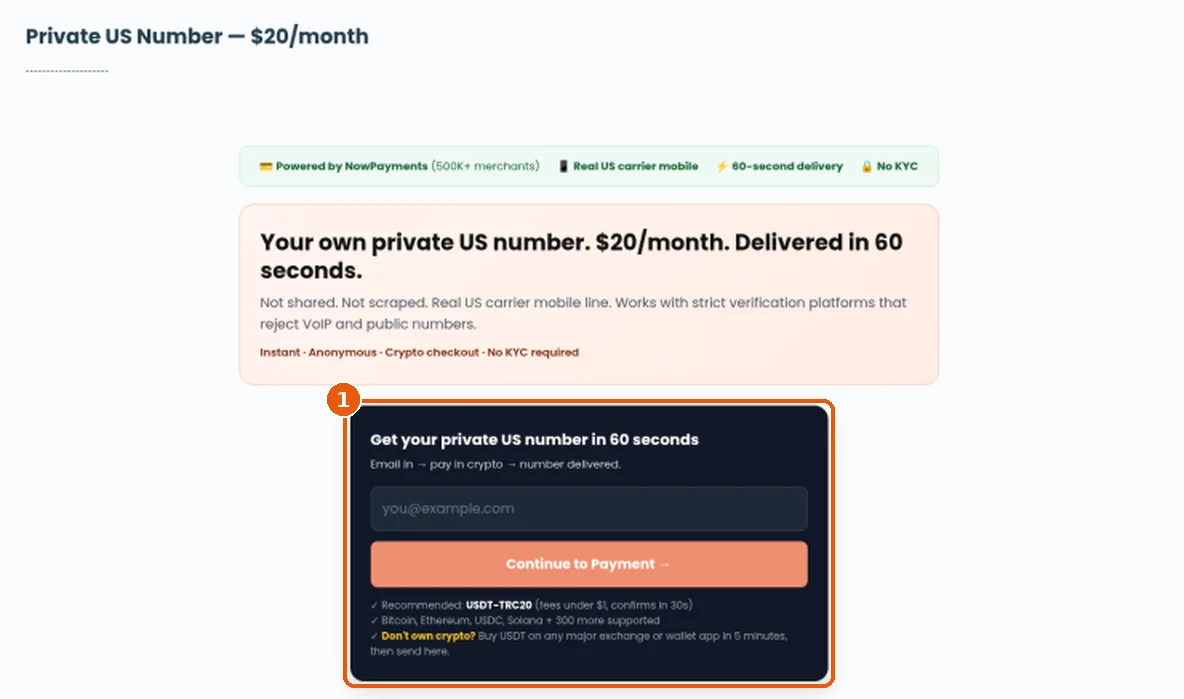
Open the private number page Go to virtualwebphone.com/premium. The dark order box (highlighted) is where the purchase starts. The price is $20 a month, shown at the top.
Step 1: the order box on /premium.
2
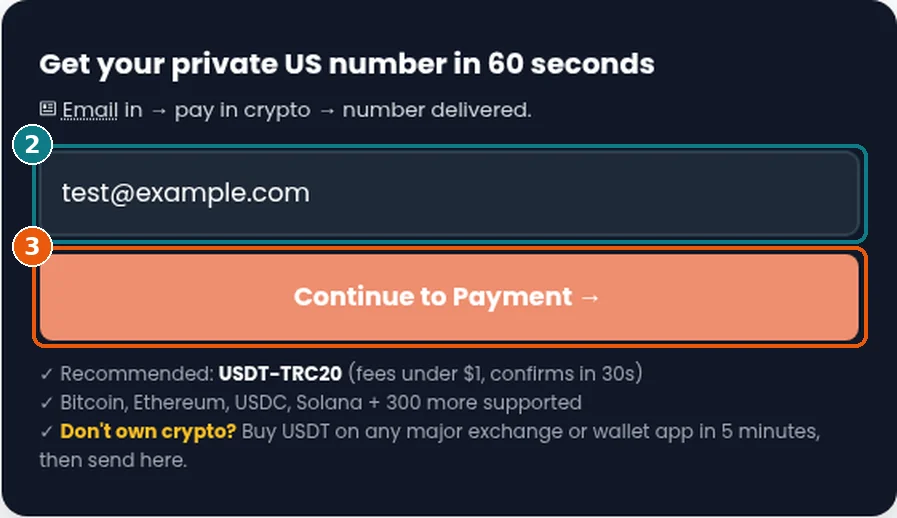
Enter your email Type the email where you want the number sent (box 2 in the screenshot). Check the spelling twice. This email is the only thing on file, and it is where your number and private inbox link go.
3
Click “Continue to Payment →” Press the orange button (box 3). The site creates your order and sends you to a secure NowPayments checkout page for $20.
Steps 2 and 3: email in, then Continue to Payment.
4
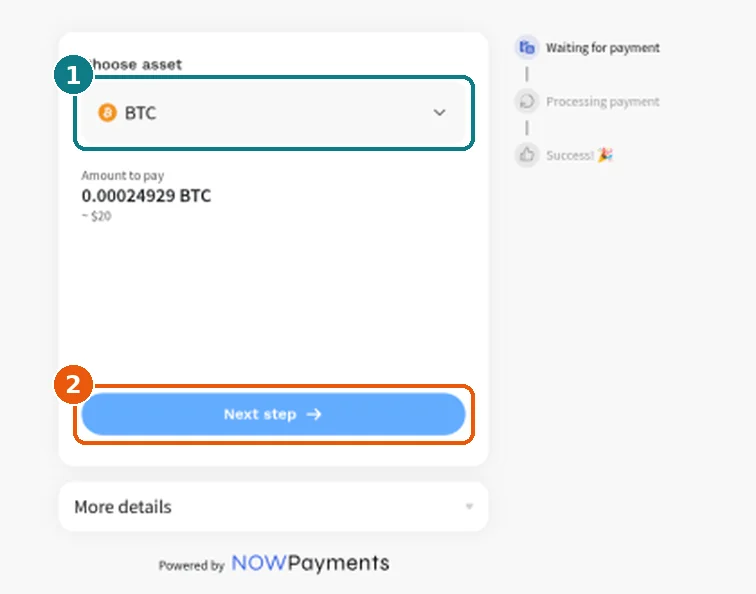
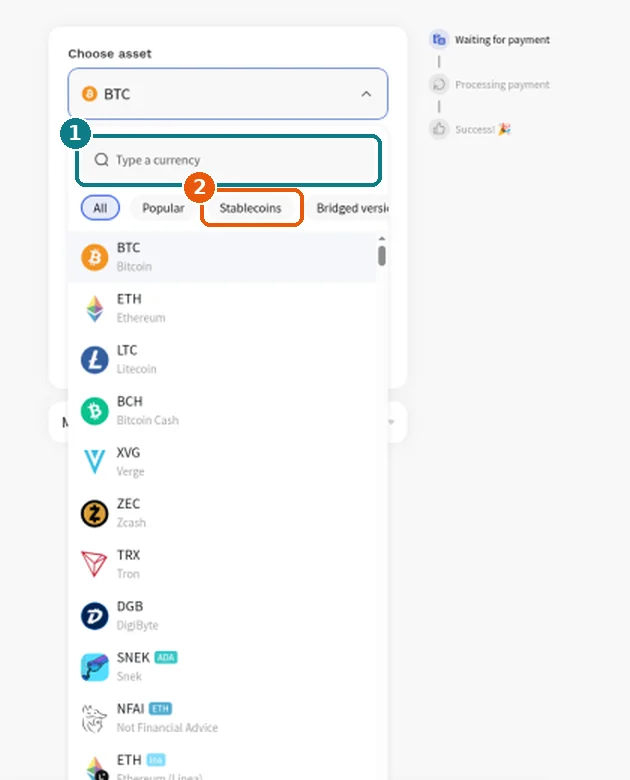
Pick the coin you will pay with NowPayments opens with Bitcoin (BTC) selected by default and shows the amount to pay, about $20 in that coin. Click the coin dropdown (box 1) to change it. You can type a currency name in the search box, or open the Stablecoins tab. We suggest USDT on TRON (TRC20). Pick the version that matches the network your wallet or exchange will send on. Then click Next step.
Step 4a: the coin dropdown and the Next step button.Step 4b: search for a coin, or open the Stablecoins tab.
5
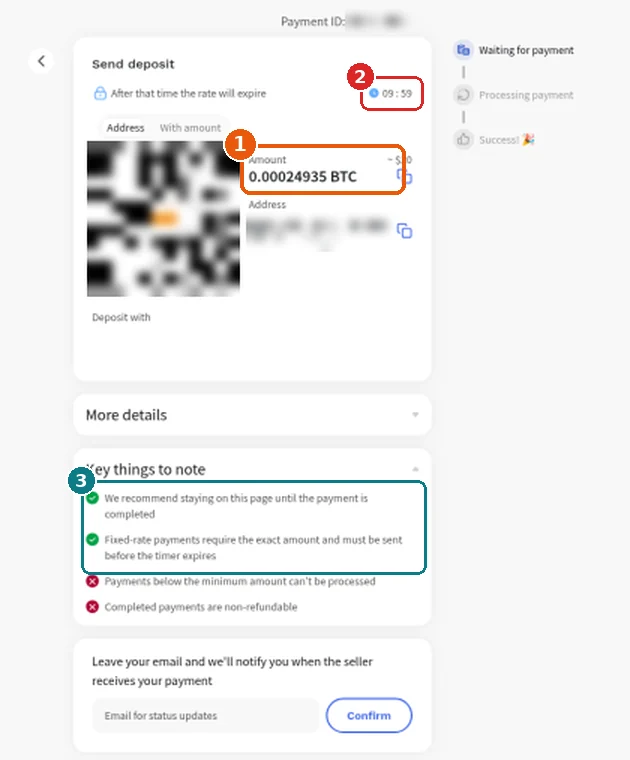
Send the exact amount before the timer runs out The “Send deposit” page shows a QR code, the exact amount (box 1) and a deposit address, each with a copy button. A countdown (box 2) starts at about 10 minutes. After that the rate expires. Copy the address and amount into your wallet, or scan the QR code, and send it. NowPayments’ own notes (box 3) ask you to stay on this page until the payment completes and to send the exact amount before the timer ends.
Step 5: amount, timer and NowPayments’ notes. The QR code, address and payment ID are blurred here. Yours will be unique to your order.
6
Get your number When the payment is complete, NowPayments sends you back to your private inbox page on VirtualWebPhone. While the payment is still confirming on the blockchain, that page says “Your payment is being processed”. Refresh after a minute. As soon as the payment is confirmed, your number is issued and two things happen:
On screen
Your number in large type with a Copy number button, an Active badge with days left and the expiry date, and a Messages list where your codes land.
In your email
A message from [email protected] titled “Your VirtualWebPhone Private Number: +1…” with the number, the date it is active until, and your private inbox link.
Then copy the number into the app or site that needs it, send the code, and come back to your inbox link to read it.
Keep your inbox link private. Anyone with that URL can read your messages. Bookmark it, do not post it, and do not share screenshots of it.
Send the exact amount that arrives. The amount on the deposit page already includes the network fee. Exchanges often take their own withdrawal fee out of what you send. If yours does, add enough that the amount received matches the amount on screen.
Send before the timer ends. Have your wallet open before you click Next step, so you can paste and send inside the roughly 10 minutes.
Match the network. USDT exists on several networks. If you choose USDT TRC20 on the checkout, send it over TRON (TRC20) from your wallet too.
Check spam and use one email. Look in Spam or Promotions if the email is not in your inbox. Use the same email every time you order, so support can find your orders quickly.
If something goes wrong
You sent too little (underpaid). A number is only issued once NowPayments marks the payment complete. Part-payments stay pending, and NowPayments notes that payments below the minimum can’t be processed. Contact support with your email and the Payment ID shown at the top of the deposit page.
You sent on the wrong network or the wrong coin. The payment will not match your order. Do not send again. Contact support with the transaction hash from your wallet and the Payment ID.
The timer ran out. If you had not sent anything yet, go back to /premium and start a fresh order. If you sent after the timer expired, do not start a second payment. Contact support with your transaction hash first.
No email arrived. Check Spam and Promotions, and check the private inbox page you were sent back to after paying. If neither shows your number, email [email protected], or tap the chat bubble in the bottom-right corner of any page on the site.
How long it lasts and renewing
Each $20 payment covers 30 days from the moment your number is issued. Crypto cannot be charged automatically, so nothing renews on its own and you are never billed again unless you pay again. When the 30 days end, your inbox page shows Expired with a link back to /premium to order another 30 days. If keeping the same number matters to you, email support before it expires.
Private US number
$20 for 30 days, paid with crypto. No account needed.
Your own number and a private inbox, instead of a shared public page. It is still an online number, so it is not a promise that every app will accept it.
How much does a private US number cost? $20 for 30 days, priced in US dollars and paid in crypto through NowPayments.
Can I pay with a card or PayPal? No. Checkout is crypto only. If you do not hold crypto, buy USDT on an exchange or wallet app and send it from there.
Which coin should I use? A stablecoin is easiest because its price does not move while you pay. USDT on TRON (TRC20) is what the site recommends. Any coin offered on the checkout works as long as you send the exact amount on the matching network.
How fast do I get the number? It is issued automatically as soon as NowPayments confirms your payment. How long that takes depends on the coin’s network. Fast networks like TRON usually confirm in about a minute, and Bitcoin can take longer.
Do I need to create an account? No. You only enter an email. Your private inbox link is your access, so keep it safe.
Is the number shared with anyone? No. Unlike the free numbers, it is not listed on a public page. Your texts only show on your private inbox link.
Does it renew automatically? No. Each payment covers 30 days. When it expires, you can order again from /premium.
Who do I contact if something goes wrong? Email [email protected] or use the live chat bubble in the bottom-right of the site. Include your email and the NowPayments Payment ID.

One thought on “How to Buy a Private US Phone Number ($20/month): Step-by-Step with Screenshots”