
How to Stop Spam Texts: iPhone, Android and Carrier Settings, 7726, and When to Reply STOP (2026)

Stop spam texts in layers: iPhone Screen Unknown Senders and Filter Spam, Google Messages spam protection, free T-Mobile, Verizon and AT&T tools, when replying STOP works, reporting to 7726, the FTC and FCC, the Do Not Call Registry, and keeping your main number off sign-up forms.

Spam texts rarely disappear because of one setting. The messages that keep reaching you are slipping past a single layer of defence: your phone’s filter, your carrier’s network checks, or the marketing list your number ended up on. This guide works through all four layers in order: the switches to flip on iPhone and Android today, the free tools T-Mobile, Verizon and AT&T already run, when replying STOP helps and when it backfires, how to report junk so it gets blocked for everyone, and how to keep your main number off the lists that feed the next wave. Steps were checked against Apple, Google, carrier, FTC and FCC pages on 18 Oct 2026.

Short answer
Turn on your phone’s spam and unknown-sender filters, switch on your carrier’s free spam tools, forward junk to 7726, and never reply to an unknown sender, not even with STOP.
iPhone (iOS 26): Messages > Filters > Manage Filtering > Screen Unknown Senders. Android: Google Messages > profile picture > Messages settings > Protection & Safety > Spam protection. Then cut the supply: register on the Do Not Call list and stop typing your main number into sign-up and quote forms.

Why spam texts suddenly spike (and where spammers get your number)

A sudden jump from one junk text a week to several a day almost always means your number landed on a new list. The FTC lists the usual bait: fake prizes, gift cards and coupons, low-interest credit card offers, student loan “help”, warnings about suspicious activity on an account, fake invoices, and package delivery notices. The goal is the same each time: get you to tap a link, reply, or hand over a password or card number.

Breached databases
When a shop, app or service you used leaks its customer data, phone numbers get bundled and resold. Your number can start drawing junk months after the breach itself.
Forms you filled in
Sweepstakes, quote requests, coupon pop-ups and Wi-Fi sign-in pages collect mobile numbers, and their privacy policies may let them share or sell the data.
Number-range blasting
Some senders simply text every number in a range. A single reply, or a tap on a tracked link, tells them yours is live and worth targeting again.

The fix depends on which of these is feeding you. Filters and carrier tools handle the blasting. Reporting helps networks shut down campaigns. Only keeping your number out of forms and databases reduces the supply over time.

iPhone: Screen Unknown Senders, Filter Spam and Block Contact (iOS 26)

iOS 26 reorganised message filtering. Apple’s spam filter is on by default, but the unknown-sender screen is off by default unless you had the older Filter Unknown Senders switch turned on before you upgraded. Here is the full setup:

1
Open Messages and tap the Filters button at the top of the conversation list.
2
Tap Manage Filtering and turn on Screen Unknown Senders. Texts from numbers that aren’t in your contacts, and that you haven’t talked to, now go to an Unknown Senders list without notifying you.
3
Leave Filter Spam on. Messages that Apple’s on-device detection flags as junk go straight to the Spam folder, silently.
4
Tap Allow Notifications (in the US, Brazil and India) and keep Time Sensitive switched on, so one-time codes and urgent alerts from unknown numbers still ping you. Personal, Transactions and Promotions are your call.
5
Report what slips through: swipe left on the conversation and choose Delete and Report Spam, or open it and tap the Report Spam link at the bottom. Apple notes you can’t report a message after you’ve replied to it.
6
Block repeat senders: open the conversation, tap the sender’s icon at the top, tap Info, scroll down and tap Block Contact. Review the list later in Settings > Privacy & Security > Blocked Contacts.

Still on iOS 18 or earlier? The equivalent switch is called Filter Unknown Senders, under Settings > Messages (Settings > Apps > Messages on iOS 18). Under Manage Filtering you can also enable a Text Message Filter extension if you have installed a third-party filtering app.

Why some junk still lands in your main list: Apple says filtering doesn’t apply to any sender you’ve replied to three or more times, and that reporting spam doesn’t stop a sender from texting again. Blocking does, for that one number or email address.

Android: switch on Google Messages spam protection, then block and report

Most Android phones use Google Messages, where spam protection is usually turned on automatically. It uses on-device machine learning to spot known spam patterns, and checks links in messages with Google to make sure they are not malicious. To confirm it is on:

1
Open Google Messages and tap your profile picture or initials at the top right.
2
Tap Messages settings > Protection & Safety > Spam protection. Google notes the option only appears if your device supports it.
3
Turn on Enable spam protection. Suspected spam is hidden in the Spam & blocked folder or dropped before delivery.
4
Block and report a sender: touch and hold the conversation, tap Block, tick Report spam, then tap OK. Inside a conversation, use More options > Details > Block & report spam.
5
Check the Spam & blocked folder now and then for real messages that were caught by mistake, and mark them as not spam.

What a report shares: Google receives the sender’s number and the last 10 messages from them (not your replies, and not linked to your name), and your phone may send a copy of the spammer’s number and latest text to your carrier through a separate “Spam reporting” conversation. If your phone uses a different texting app, such as Samsung Messages, look for the block and spam options in that app’s settings, or install Google Messages from the Play Store.

Carrier tools: what T-Mobile, Verizon and AT&T already block for you

All three major US carriers filter text spam on their networks before it reaches any phone. Their apps add extra controls, and one setting in particular, email-to-text, is worth knowing about.

CarrierNetwork filteringFree controlsWorth knowing
T-MobileAnti-spam for SMS and MMS since 2014, at no extra chargeScam Shield in the T-Life app (postpaid). Dial #662# to turn on Scam Block for Scam Likely calls, including on prepaid.Blocking calls and texts from specific numbers on the network is a paid Scam Shield Premium feature.
VerizonBlocks spam texts behind the scenesCall Filter for spam screening, plus blocking specific senders in your My Verizon accountVerizon’s own advice: don’t respond to suspicious texts, “not even to say STOP”.
AT&TNetwork filters block spam texts for every customerFree ActiveArmor app with a personal block listActiveArmor can switch off email-to-text messages, and on iPhone can sort texts into unknown, junk, promotions and transactions folders.
Prepaid and smaller carriersVariesAsk your carrier, or see the list of tools the FTC points to at ctia.orgYour phone’s own filters (above) work on any carrier.
Email-to-text is a spam firehose: Texts that appear to come from an email address are sent through a carrier’s email gateway, and the FCC has called email-to-text a major source of illegal texts. If you never use it, turn it off where your carrier allows, and block persistent addresses on iPhone the same way you block a number.

Reply STOP or ignore? A sender-by-sender decision table

“Never reply” and “just text STOP” are both half right. The deciding question is whether you ever gave this sender your number. Under FCC rules in force since 11 April 2025, replying stop, quit, end, revoke, opt out, cancel or unsubscribe to a robotext you agreed to receive counts as a valid opt-out, and the sender has to honour it within a reasonable time of no more than 10 business days. Scammers ignore those rules, so a reply to them only confirms your number is active.

Who it is fromTypical messageReply STOP?What to do instead
A brand you signed up with, usually a 5–6 digit short code that names the companyWeekly coupons, order updates you no longer wantYes. Any of the seven keywords works.Keep the confirmation text. If the messages keep coming after 10 business days, report it.
An unknown 10-digit number or an email address“Your package is on hold”, “unpaid balance”, prize claimsNo.Don’t tap the link. Report it, block it, delete it.
Someone claiming to be your bank, a store or a government agency“Suspicious sign-in on your account, confirm here”No.Contact the organisation using a number or website you already know is real, not the one in the text (FTC advice).
A friendly “wrong number”“Hi, is this Emma? Lunch still on?”No.Ignore it. Chatty wrong-number openers are a common way to start a conversation that ends in an investment or romance pitch.
A political campaignDonation asks, polling-day remindersYour choiceThe FCC treats autodialed political texts (consent needed) differently from manually sent ones (no consent needed). If you recognise the campaign, STOP is a reasonable opt-out; otherwise treat it like any unknown sender.
Don’t “unsubscribe” from scams: Links that say “tap here to opt out” in an unexpected text are part of the trap. Replying or tapping tells the sender a real person reads this number, and on iPhone it also removes the Report Spam option for that message.

Report it: 7726, ReportFraud.ftc.gov and the FCC

Reporting won’t stop the next text by itself, but it is how carriers and regulators find the senders and shut whole campaigns down. It takes under a minute:

1
Forward the message, unedited, to 7726 (it spells SPAM on a keypad). T-Mobile and AT&T say these reports are free and don’t count toward your plan. If your phone can’t forward, copy the text and paste it into a new message to 7726.
2
Answer the follow-up. Some carriers reply asking for the number the spam came from. Send it back in the format they request.
3
Report it in your messaging app too (Report Spam on iPhone, Block & report spam in Google Messages), so Apple or Google can improve their filters.
4
File with the FTC at ReportFraud.ftc.gov, especially if you tapped a link, entered details or lost money.
5
File with the FCC at consumercomplaints.fcc.gov under the unwanted calls category. The FCC doesn’t resolve individual complaints, but it uses them to decide where to take enforcement action.

Those reports feed real powers. Since 2023, FCC rules have required mobile carriers to block texts that claim to come from invalid, unallocated or unused numbers. Since July 2024 they must also block texts from a specific number once the FCC’s Enforcement Bureau notifies them, unless their own investigation finds the texts are not illegal.

Do Not Call Registry and your legal rights against marketing texts

The National Do Not Call Registry is not just for calls. In March 2024 the FCC codified that its protections extend to text messages: a marketer needs your prior express invitation or permission before texting a mobile number that is on the list.

RuleWhat it means for you
Do Not Call applies to texts (since 26 Mar 2024)Register free at donotcall.gov, or call 1-888-382-1222 from the phone you want to register. Legitimate marketers must then stop unsolicited marketing texts.
Consent is required for autodialed textsCommercial robotexts need your written consent, and FCC rules apply even if your number is not on the registry.
You can revoke consent any reasonable wayThe seven STOP keywords count automatically, and senders can’t force you to use only their own opt-out method.
State do-not-call listsMany states run their own list. Your state’s public service commission or consumer protection office can tell you if yours does.
Where to complainReport Do Not Call violations and scams to the FTC; report illegal texts to the FCC.

Be realistic: scammers already break the law, so the registry won’t stop them. What it does is remove the “legitimate” marketers who were texting you without permission, and it gives you clear grounds to complain if they don’t.

Stop the leak: keep your main number off sign-up forms

Filters treat the symptoms. The FCC’s own advice goes after the cause: be careful about giving out your mobile number, read a site’s privacy policy before you enter it, and look for the opt-out checkbox. The places that most often turn a number into a marketing lead are:

  • Giveaways, sweepstakes and “spin to win” coupon pop-ups.
  • Insurance, loan, solar and moving quote forms, which often pass your details to several companies.
  • Public Wi-Fi sign-in pages and store loyalty programmes that ask for a mobile number.
  • Classifieds and marketplace listings where your number is visible to anyone.

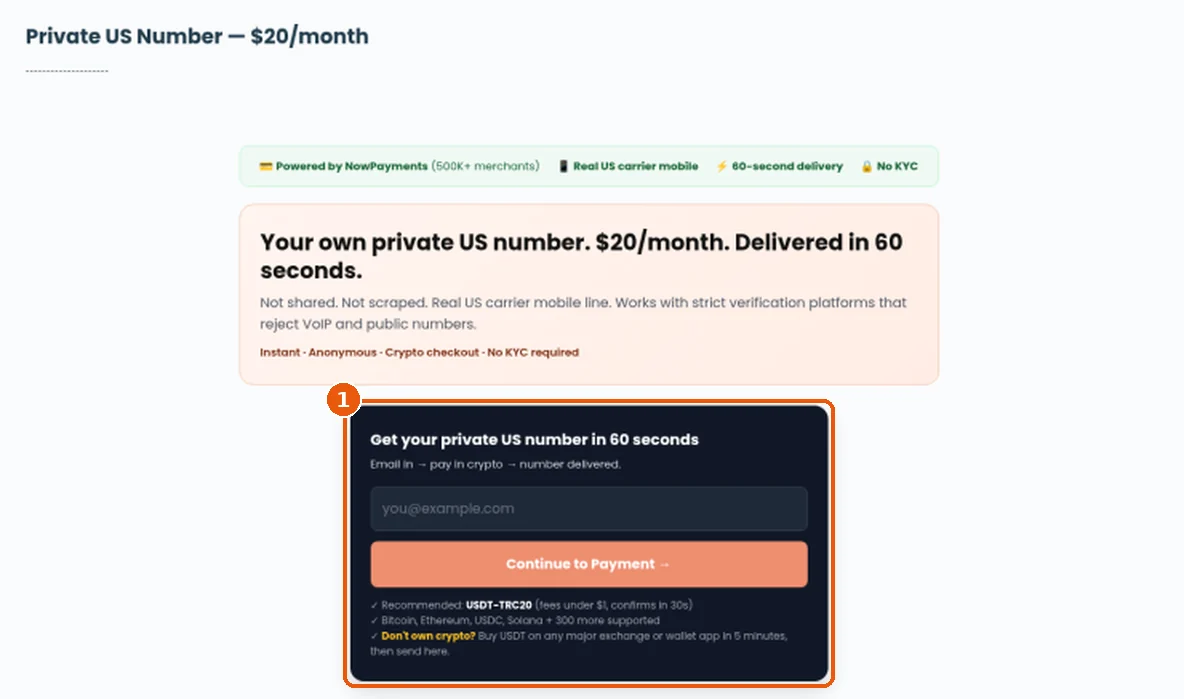
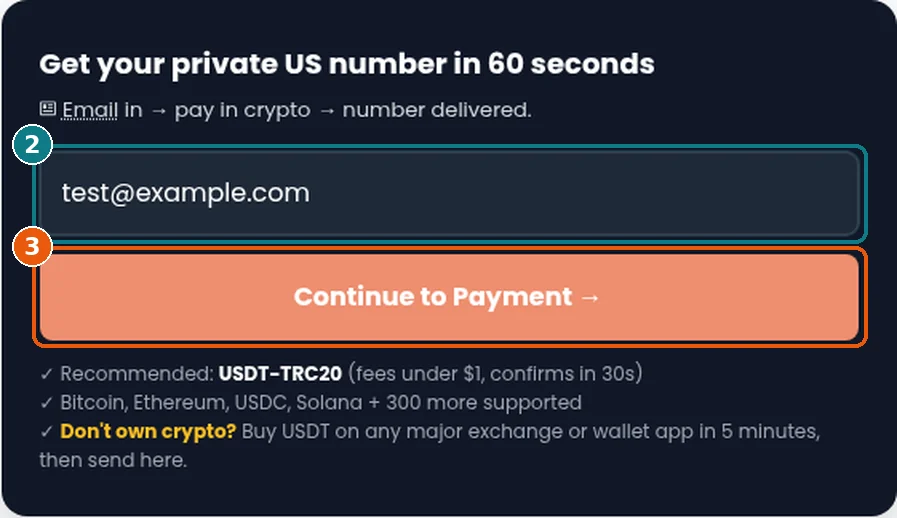
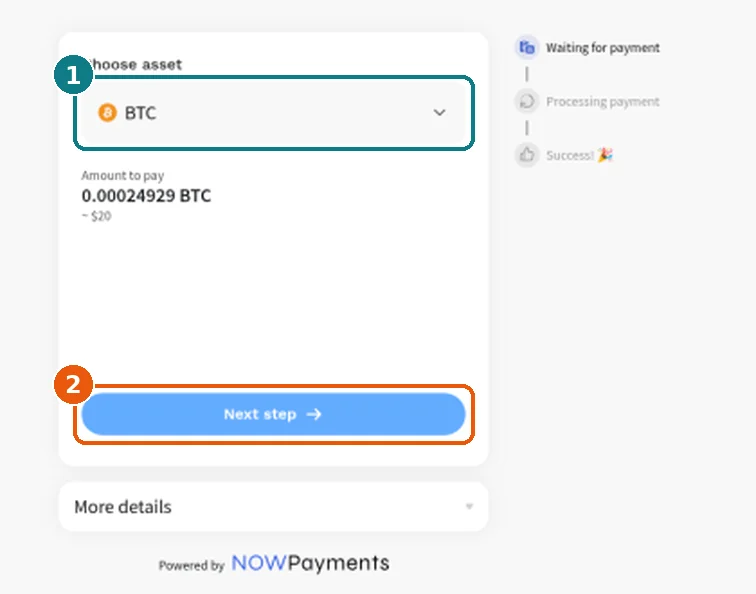
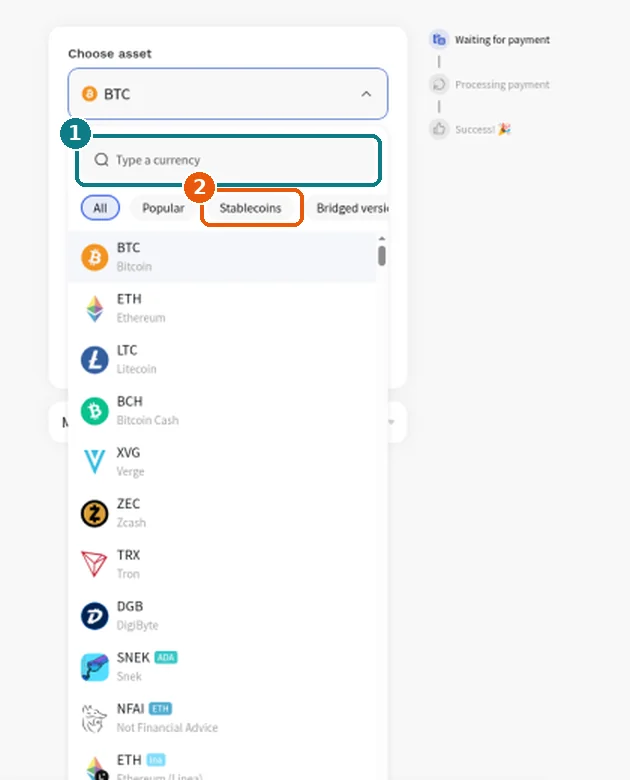
For those, give a second number instead of the one tied to your bank, your two-factor logins and your family. If you want a permanent second line, compare the options in our Google Voice alternatives guide. For a short project, such as selling a car or running a listing for a few weeks, a month-long private US number keeps the replies away from your real phone. Here’s how buying one on VirtualWebPhone works, step by step.

Two honest limits. A second number won’t clean up spam already reaching your main number; the layers above do that. And free public inboxes, ours included, can be read by anyone, so use them only for throwaway confirmations, never for anything that could send personal details. Messaging apps leak numbers too: our Telegram guide shows how to keep your number hidden from other users.

Good habit: When a form says “enter your mobile for exclusive offers”, that is an invitation to a marketing list. Use your second number or skip the field, and keep your main number for people and accounts you actually trust.
A separate number for sign-up forms
Private US number: $20 for one month.
Crypto checkout via NowPayments. Number and private inbox link sent by email. No automatic charge; renewing keeps the same number. Free shared numbers are for throwaway texts only.

Spam calls play a similar trick with area codes: a one-ring call from 809 or 876 looks like a US number but is billed as an international call. Our guide to area code 212 shows how to tell a real US area code from a country code, including why +212 is Morocco, not Manhattan.

Selling something online? A number shown on a classified ad is one of the fastest ways onto spam lists. Our phone number for Craigslist guide shows how to sell with relay email or a second number, and how to spot the six-digit code scam.

Fake “Amazon” delivery and login texts are some of the most common spam. Our Amazon OTP guide shows how to tell a real Amazon one-time code from a scam, and why nobody who calls you should ever get the code.

Spam text FAQ

Why am I suddenly receiving so many spam texts?
Usually your number has landed on a new list, from a data breach, a form or giveaway you entered, or a sender texting whole number ranges. Replying or tapping a link confirms the number is active, which brings more. Turn on your phone’s filters, report the junk, and keep your main number off sign-up forms.
Does 7726 really work?
Yes, but not instantly. Forwarding a spam text to 7726 sends it to your carrier, which uses reports in bulk to spot and block similar messages for all customers. It’s free with the major US carriers. It won’t stop the next message on its own, so also block the sender and use your phone’s spam filter.
Why isn’t my iPhone blocking spam texts?
In iOS 26, Screen Unknown Senders is off by default, so check Messages > Filters > Manage Filtering. Filtering also doesn’t apply to anyone you’ve replied to three or more times, and spammers rotate numbers, so a block only stops the one number or email you blocked.
Can you automatically block spam texts?
Mostly. iPhone’s Filter Spam (on by default in iOS 26) and Google Messages spam protection sort suspected junk automatically, and T-Mobile, Verizon and AT&T filter spam on their networks. No filter catches everything, so keep reporting what gets through.
Why do messages still come through when blocked on iPhone?
Blocking stops one specific number or email address. Spam campaigns send from many numbers and email-to-text addresses, so each new sender gets through until it’s caught. You also can’t block a group conversation; leave it or mute it instead.
How do I stop receiving spam texts permanently?
No single switch does it. Combine phone filters, your carrier’s tools, reporting to 7726, and the Do Not Call Registry for legitimate marketers. Then stop the supply by giving a second number to giveaways, quote forms and loyalty sign-ups.

Worried about more than spam now that strangers have your number? Our guide to what someone can do with your phone number ranks the real risks, from people-search lookups to SIM swaps, and the setting that stops each one.

More guides

Google Voice alternative · Telegram without a phone number · Rent a phone number · SMS-Activate alternative · How to buy a private US phone number
SMS-Activate Alternative: What Happened, Fake Clones, and Replacements Compared (2026)

SMS-Activate closed on 22 December 2025 and handed its tech to HeroSMS. Here is the shutdown timeline, how to re-secure accounts tied to its numbers, how to spot fake SMS-Activate clones, and how HeroSMS, SMSPool and TextVerified compare.

If you are hunting for an SMS-Activate alternative, the first thing to know is that the old service is not down for maintenance. SMS-Activate closed for good in December 2025 and handed its technology to a new brand, HeroSMS. That leaves three practical jobs: rescue any account still tied to one of its numbers, avoid the fake “SMS-Activate” sites that popped up afterwards, and choose a replacement that fits what you actually used it for. This guide covers all three, with provider details checked on their own websites on 17 Oct 2026.

Short answer
SMS-Activate stopped operating on 22 December 2025 and is not coming back. HeroSMS is its official successor; SMSPool and TextVerified are the best-known independent options.
Pick by job: pay-per-code marketplaces for a one-off code, US non-VoIP rentals for strict apps, and a month-long private inbox when you need the same number to keep receiving texts. Any site still calling itself SMS-Activate is, by the company’s own warning, a scam.

What happened to SMS-Activate: the 2025 shutdown timeline

SMS-Activate ran for about ten years as one of the largest pay-per-activation marketplaces. Its closure came in two stages, and the dates matter if you still have a balance or accounts linked to its numbers.

WhenWhat changedSource
25 Aug 2025SMS-Activate pulled out of Russia: Russian numbers removed, rouble payments switched off, ahead of a Russian law (in force 1 Sep 2025) banning the transfer of subscriber numbers to third parties.Computerra report on the company’s notice
December 2025Closure announced. The price page told users the service would no longer be available and pointed them to HeroSMS.sms-activate.page/price
22 Dec 2025All activity stopped. The official closure page says the service is closed and thanks users for ten years.sms-activate.page closure notice
Early 2026Balance withdrawals ended (the closure page says they were possible until 5 February). Small balances could be moved to HeroSMS with a one-time promo code.Closure notice and SMS-Activate’s farewell post
Until 30 Apr 2026The only contact left was an email inbox for important questions, with replies within 7 days. That window has now passed.Closure notice
Closed for good
No relaunch is planned. Logins, the API and every number it rented stopped working when the systems were switched off.
HeroSMS took the tech
SMS-Activate says it handed its technical platform to the HeroSMS team, and HeroSMS describes itself as built on that infrastructure.
The name is retired
The company warned that any service calling itself SMS-Activate after the closure is run by scammers, not by the original team.
Missed the withdrawal deadline? The closure page says there is no longer anyone to process requests. Treat any leftover balance as gone, and ignore anyone who offers to “recover” it for a fee.

Accounts still tied to an old SMS-Activate number: re-secure them first

This is the part most “alternatives” lists skip. Every account you registered with an SMS-Activate number still has that number on file, and you can no longer receive a single text on it. The number was a short rental to begin with, and it can be reissued to someone else. If an app ever asks for an SMS code to log in or reset your password, you are locked out. Fix that now, while you can still sign in.

1
List the accounts. Search your email for welcome and verification messages from the months you used SMS-Activate, and note every service that might have its number saved.
2
Sign in while your session still works and open each service’s security or account settings.
3
Replace the phone number with one you will control long term: your own SIM, or a private number you keep paying for. A one-off code number is not a recovery number.
4
Switch two-factor login to an authenticator app (or passkeys) where the service offers it, so a future number change cannot lock you out.
5
Save backup codes somewhere safe, offline or in a password manager.
6
Remove the old number completely, so a stranger who later gets that number cannot trigger an SMS reset on your account.
Good habit: Treat any number you bought for a single code as disposable from the moment the code arrives. If an account matters to you, put a number on it that you will still have next year.

Fake “SMS-Activate” sites and messages: how to spot the clones

Big brands that disappear leave a gap that copycats rush to fill. SMS-Activate addressed this directly: its final notice says the brand is no longer operating, and that an incoming message signed “SMS-Activate” is a scam. Watch for these signs:

  • A site using the SMS-Activate name or logo that lets you sign up, log in or top up. The real systems were shut down, so a working login means it is not the original.
  • Emails, Telegram or WhatsApp messages from “SMS-Activate support” offering refunds, balance recovery or a “new version” of the service.
  • Requests to enter your old SMS-Activate password anywhere. If you reused that password elsewhere, change it on those sites now.
  • Ads promising “SMS-Activate 2.0” or “the official mirror”. The company said its name went with it.
Don’t pay a clone: Topping up a fake SMS-Activate site means sending money to an unknown operator with no refund path. If you want the successor, go to HeroSMS directly rather than through a link in a message.

SMS-Activate alternatives compared: model, coverage, payments (checked 17 Oct 2026)

These are the replacements people most often move to, described from each provider’s own website on 17 Oct 2026. Prices change often, so confirm on the provider’s pricing page before you top up.

ServiceHow it worksCoveragePaymentsPrice shown on its site
HeroSMSPay per activation. You get a number for one service for about 20 minutes, and the money returns to your balance automatically if no SMS arrives.180+ countries, 700+ listed sites and appsBalance top-ups (methods listed after sign-up)Per service and country inside the dashboard; five discount levels by top-up size
SMSPoolOne-time numbers per service, plus long-term non-VoIP rentals. Unused numbers are refunded, according to its site. Dutch company (SMSPool B.V.).Many countries, picked per orderCard, Apple Pay, Google Pay and iDEAL through Stripe; crypto through partnersPublished price estimator before sign-up
TextVerifiedUS-only real mobile numbers backed by physical SIMs (non-VoIP). One-off SMS or voice verifications, 1 to 14 day rentals, or long-term rentals renewed every 30 days.United States only, usable from abroadCard through Stripe, or cryptoFrom $0.25 per verification, $1.50 per short rental, $5/month long-term
VirtualWebPhoneFree public US inboxes for throwaway texts, or a private US number with its own inbox for one month.US numbersCrypto checkout through NowPaymentsFree shared numbers; private number $20 for one month, no automatic charge; renewal keeps the same number

Honest note: if your only goal is a code from a strict US app, a non-VoIP verification number can cost far less than our private number. A month-long inbox makes sense when you want one number that keeps receiving texts from several sites for weeks. For other angles on the same market, see our TextNow alternative comparison and Google Voice alternatives.

Pay-per-code marketplaces vs month-long US numbers: pick by job

Most SMS-Activate customers used it for one of a handful of jobs. Matching the replacement to the job saves money and avoids failed codes.

What you used SMS-Activate forWhat to look for now
One code for a forum, newsletter or app trialAny pay-per-activation marketplace with automatic refunds, or a free public inbox if you do not care who sees the text.
A US app that rejects VoIP numbersA provider that states its US numbers are non-VoIP mobile lines. Our Discord verification guide shows how strict apps check line type.
Keeping one number for a few weeks of sign-ups and loginsA rental or month-long private number, so repeat codes reach the same inbox.
Accounts you will keep for years (email, shopping, socials you care about)Your own SIM or a number you will keep renewing. Temporary numbers are a poor fit for recovery.
Banking, payment apps or crypto exchangesUse your own mobile number. These services tie the number to your identity, so a shared or temporary number is the wrong tool here.
Shortcut: If you want the closest like-for-like experience, HeroSMS is the official successor. If you mainly need US codes, compare it with a US-focused non-VoIP provider before topping up.

A five-minute checklist before you top up any replacement

1
Check the line type the provider promises for your target app (VoIP numbers get rejected by many sign-up forms).
2
Read the refund rule for codes that never arrive. Automatic refunds, like the ones HeroSMS and SMSPool describe, beat support tickets.
3
Start with the smallest top-up the site allows and test one order before loading more money.
4
Note how long you hold the number. A 20-minute activation cannot receive a login code next week.
5
Use the provider’s real domain typed by hand, not a link from a message or an ad.
6
Read the target app’s rules. Using a second number for privacy is normal; using numbers to dodge bans or mass-create accounts breaks most platforms’ terms and can get every account closed.

New to the difference between shared and private inboxes? Our receive SMS online guide explains it in a few minutes.

Second number for sign-ups
Private US number: $20 for one month.
Crypto checkout via NowPayments. Number and private inbox link sent by email. No automatic charge; renewing keeps the same number. Free shared numbers are for throwaway texts only.

SMS-Activate alternative FAQ

Is SMS-Activate shut down permanently?
Yes. Its official closure page says the service fully stopped operating on 22 December 2025, and it has no plans to return. Withdrawals ended in early 2026.
Is HeroSMS the new SMS-Activate?
HeroSMS is the successor SMS-Activate itself recommended. SMS-Activate says it handed its technology to the HeroSMS team, but HeroSMS is a separate brand with its own accounts, so old SMS-Activate logins and balances do not carry over automatically.
Is there a free SMS-Activate alternative?
Free public inbox sites, including VirtualWebPhone’s free US numbers, can receive codes at no cost, but anyone can read the messages and popular apps often reject those numbers. They suit throwaway sign-ups only.
Which SMS-Activate alternative works for US numbers that are not VoIP?
Look for a provider that states its US numbers are real mobile lines. TextVerified, for example, says its US numbers are backed by physical SIMs. Always test one cheap order first.
Can I get my SMS-Activate balance back?
Almost certainly not. The withdrawal window closed in early 2026, and the closure page says there is no longer a team to handle requests. Be wary of anyone offering to recover it.
What should I do about accounts registered with an SMS-Activate number?
Sign in now and replace that number with one you control long term, turn on an authenticator app or passkeys, and save backup codes. The old number can no longer receive your codes and may be reissued to someone else.

More guides

TextNow alternative · Google Voice alternative · Discord phone verification · Telegram without a phone number · How to buy a private US phone number
Discord Phone Verification: Errors, What Discord Accepts, and Privacy Options (2026)

Discord requires a real mobile number — VoIP, burner, and landlines are rejected. Decode Invalid phone number, rate limits, and already-registered errors, plus privacy-minded options that stay inside Discord’s rules.

Discord phone verification is not optional busywork. Discord’s own help center says a valid mobile number may be required for safety checks, and that VoIP, burner, and landline numbers cannot be used. This guide walks through why Discord asks, the exact error messages you may see, which numbers it accepts, and privacy-minded options that stay inside Discord’s rules — not workarounds for bans or multi-accounting.

Short answer
Discord requires a real mobile number. Official docs reject VoIP, burner, and landline lines — so Google Voice, TextNow, and most online SMS inboxes fail with “Invalid phone number.”
Use a mobile SIM you control. One number can only sit on one Discord account. If you need a second inbox for other apps that do accept inbound SMS, VirtualWebPhone’s $20/month private US number is separate from Discord’s mobile rule.

Why Discord asks for a phone number

Discord frames phone verification as a safety system. According to Discord Support (How to Verify Your Discord Account, updated Oct 2024), verifying email or phone helps prove you are not a robot and keeps spam out of communities. You may see a Verification Required prompt when Discord’s systems flag activity such as joining many servers quickly, messaging many strangers, posting faster than a typical human, or using third-party clients.

Separately, server owners can set verification levels. At the highest level, members need a verified phone on their Discord account before they can chat or join voice. A verified phone supersedes lower checks (email-only, wait timers), per Discord’s Verification Levels article.

Account safety check
Discord may demand a phone after unusual activity — multi-server joins, mass DMs, or third-party clients — even if you never joined a strict server.
Server “Highest” level
Admins can require a verified phone before chat/voice. Meeting that bar unlocks every lower verification level on that server.
One number, one account
Discord allows a mobile number on only one account at a time. Reusing it elsewhere fails until you remove it from the first account.
Honesty first: This guide follows Discord’s published rules. Do not use second numbers to evade a ban, create banned alternate accounts, or break Discord’s Terms of Service.

Official Discord phone verification steps

You can add a number from User Settings when Discord is not forcing a prompt, or from the Start Verification flow when it is. Steps below match Discord’s Getting Started and verify-account articles (desktop/browser path first; mobile is the same idea under the profile gear).

1
Open User Settings (gear icon next to your username on desktop, or Profile → gear on mobile) and go to My Account / Account.
2
Find Phone Number under Email and Phone, then press Add (or press Start Verification if Discord showed that banner).
3
Pick the correct country code and enter only the national number — do not paste the country code twice.
4
Complete the human/CAPTCHA check if Discord shows one, then wait for the SMS with a 6-digit code.
5
Enter the code, then confirm with your Discord password so the number stays linked to that account.
Tip: Keep the Discord app or browser tab open while the SMS arrives. If nothing shows up in a few minutes, check carrier spam filtering before requesting another code (rate limits apply).

Discord phone error messages decoded

Discord documents the common failures in How to Verify Your Discord Account and How to Fix Phone Errors on Discord. Matching the exact wording saves hours of random retries.

Error / symptomWhat Discord meansWhat usually fixes it
Invalid phone numberNumber mistyped, wrong country format, or line type Discord rejectsRe-enter with correct country code. Discord states VoIP, burner, and landline numbers cannot be used — switch to a real mobile SIM.
Rate Limit / Recently UsedThat number was used recently and is in a timeoutWait 24–48 hours before trying the same number again (per Discord Support).
Existing account / unable to associateNumber already linked to another Discord accountRemove the number from the other account first, then add it here. Discord: one phone per account.
CAPTCHA failuresExtra bot check during verifyRetry on a stable connection; if stuck, open a ticket at dis.gd/contact.
SMS never arrivesCarrier filter, wrong number, or rejected line typeConfirm the number can receive SMS from short codes; try cell data instead of Wi-Fi only; do not keep burning VoIP numbers Discord already rejects.
VoIP apps fail here on purpose: Google Voice, TextNow, TextFree, and most public online SMS inboxes are VoIP or recycled lines. Discord’s help text explicitly says those cannot be used. Retrying the same VoIP number rarely changes the result.

Which numbers Discord accepts (and which it rejects)

Discord’s rule is blunt: you need a valid mobile phone number that is not already on another Discord account. Landlines fail. VoIP fails. Burner-style numbers fail. Prepaid mobile SIMs sometimes work if Discord’s carrier checks treat them as mobile — there is no public whitelist, and Discord Support will not bless a specific MVNO.

  • Usually accepted: a traditional mobile number on a carrier SIM you can receive SMS on, in a supported country, not already tied to Discord.
  • Officially rejected: VoIP, burner, and landline numbers (Discord Support wording).
  • Risky / inconsistent: some prepaid or virtual-mobile products that look like mobile to you but classify as VoIP in line-type databases Discord uses.
About VirtualWebPhone and Discord: VirtualWebPhone provides free shared US inboxes and a $20/month private US number for inbound SMS in a browser. Those numbers are not marketed as Discord-approved mobile SIMs. Expect Discord to reject them the same way it rejects other VoIP lines. Use VirtualWebPhone for apps that do accept inbound SMS online; use a real mobile for Discord itself. Buy flow: how to buy a private phone number.

Server verification levels vs account phone checks

People mix up two different prompts. One is Discord locking your account until you verify. The other is a server refusing chat until your account meets its verification level.

Discord account prompt
“Verification Required” from Discord Safety — finish phone (or email) verify on your account before continuing.
Server verification wall
You joined, but cannot send messages until email age / wait time / phone is satisfied. Phone unlocks every level.
Both at once
Finish account phone verify first; then reopen the server. Admins cannot override Discord’s phone-type rules.

If a friend’s server is on Highest and your real mobile is stuck on an old abandoned account, remove the number from that account (or ask Discord Support) before you can attach it to the account you actually use.

Privacy-minded options that stay inside Discord’s rules

Wanting Discord without putting your everyday SIM in every gaming server is reasonable. Staying inside the rules means using a mobile number you legitimately control — not farming public VoIP inboxes Discord already blocks.

1
Prefer a spare mobile SIM you own (travel eSIM, old phone line, family line you control) and keep Discord 2FA / backup codes saved.
2
Remove a number from an unused Discord account before moving it, so you do not hit “already registered.”
3
Do not share one Discord-verified mobile across banned alts — that is against Discord’s rules and risks the main account.
4
For other apps (not Discord) that accept inbound SMS to an online inbox, use VirtualWebPhone free numbers for throwaways or a $20 private US number when you need an inbox only you can open. Crypto checkout via NowPayments; number + private link emailed; no automatic charge, and renewing keeps the same number.
5
Read related guides if your real problem is another app: Telegram without a phone number and why TextNow codes fail cover different platforms with different VoIP policies.
Not for banks or payment apps on VWP: VirtualWebPhone blocks SMS from banks, payment apps, and crypto exchanges on free and private numbers to reduce fraud abuse. Discord’s own VoIP ban is separate — Discord simply will not accept those line types.
Second number for sign-ups
Private US number: $20 for one month.
Crypto checkout via NowPayments. Number and private inbox link sent by email. No automatic charge; renewing keeps the same number. Free shared numbers are for throwaway texts only.

Discord isn’t the only app that keeps checking your number. Tinder texts a new code every time you log in with your phone number, and a number can be verified on only one Tinder account. Our Tinder without a phone number guide covers why the number has to stay yours and how to recover the account if it changes.

Discord phone verification FAQ

Does Discord accept Google Voice or TextNow for phone verification?
No. Discord Support states that VoIP, burner, and landline numbers cannot be used. Google Voice and TextNow are VoIP products, so they typically return Invalid phone number.
Why does Discord say my phone is already registered?
A number can only be linked to one Discord account at a time. Remove it from the other account (User Settings → Phone) or follow Discord’s remove-phone help article, then try again.
How long is the Discord phone rate limit?
Discord says to wait 24–48 hours after a Rate Limit / Recently Used error before verifying that number again.
Do I need a phone to join every Discord server?
No. Only servers whose verification level requires a phone (Highest), or account-level Verification Required prompts from Discord Safety, force phone verify. Lower server levels may only need email or wait time.
Can I verify Discord with an online SMS inbox?
Discord rejects VoIP and burner-style numbers. Public online SMS inboxes are almost always those line types, so they are a poor fit for Discord. Use a real mobile you control for Discord; use online inboxes only on platforms that accept them.
What should I do if the Discord SMS never arrives?
Confirm country code and formatting, make sure the handset can receive SMS, wait out any rate limit, and avoid VoIP numbers Discord already rejects. If a real mobile still fails after CAPTCHA, contact Discord Support at dis.gd/contact.

More guides

Telegram without a phone number · TextNow alternative · Google Voice alternative · How to buy a private US phone number · Receive SMS online
TextNow Alternative: Why Codes Fail + 6 Options Compared (Price Checked 15 Oct 2026)

Free TextNow blocks most verification codes. Paying Lock In or Ad-Free+ lifts TextNow’s gate, but many apps still reject VoIP. Compare Google Voice, TextFree, Hushed, Burner, MySudo, and a $20 private US inbox — prices checked 15 Oct 2026.

People search for a TextNow alternative for two different reasons. Some want another free app for everyday calls and texts. Others are stuck because a TextNow number will not accept the verification code they need. Those are not the same problem, and picking the wrong substitute wastes money. This guide separates TextNow’s free Wi-Fi line from its paid upgrades, explains why codes fail even after you pay, and compares honest alternatives by what they are good at (cheap talk, SMS codes, or a private inbox you open in a browser).

Short answer
Free TextNow blocks most verification codes on purpose. Paying for Lock In or Ad-Free+ removes TextNow’s own gate, but many apps still reject the number because it is VoIP.
For cheap calling/texting, Google Voice or TextFree are the usual switches. For a private US inbox that is not a recycled free app number, VirtualWebPhone’s $20/month private number is built for that job.

Why TextNow numbers get rejected for verification codes

There are two separate filters. Confusing them is why “I paid TextNow and still got nothing” posts keep showing up.

Filter 1: TextNow’s own free-tier rule. TextNow’s help center (updated 23 Jun 2026) says you can receive most verification codes only after you activate a TextNow SIM or buy a recurring upgrade such as Lock in Number or Ad-Free+. Free Wi-Fi numbers are recycled when inactive, so TextNow keeps verification off that tier on purpose. Canadian verification codes are largely unsupported even with a subscription.

Filter 2: the other app’s VoIP block. Even with Lock In or Ad-Free+ active, TextNow still tells users that some services do not support TextNow numbers for verification or 2FA because the number is VoIP. Their advice is to ask that service whether it accepts VoIP, or try a voice-call code if the app offers one. Paying TextNow removes TextNow’s gate; it does not reclassify the number as a traditional mobile line.

Do not use TextNow (or VirtualWebPhone) for banks, PayPal, or crypto exchanges: those senders often reject VoIP, and VirtualWebPhone blocks SMS from banks, payment apps, and crypto exchanges on free and private numbers to reduce fraud abuse.
What “code never arrives” usually means: either the free TextNow tier never accepted the short code, or the destination app ran a line-type lookup, saw VoIP, and refused to send. Resending the same TextNow number rarely helps.

What TextNow still does well in 2026

TextNow is still a strong pick when your goal is free or near-free calling and texting in the US and Canada over Wi-Fi or its wireless plans — not when your goal is rock-solid OTP delivery.

Free Wi-Fi / free wireless talk & text
Ad-supported. Unlimited nationwide talk and text on the free plan (checked 15 Oct 2026 on textnow.com/wireless). Numbers can be recycled if inactive. Verification codes are limited on this tier.
Paid upgrades (Lock In, Ad-Free+)
Lock In Number about $1.99/week; Ad-Free+ about $6.99/week (TextNow blog / app store pricing, checked 15 Oct 2026). Unlocks TextNow’s own verification path and keeps the number from expiring, but the line stays VoIP.
Wireless data plans (Plus / Unlimited)
Plus about $4.99/week or $18.99/month; Unlimited about $8.99/week or $35.99/month (textnow.com/wireless, checked 15 Oct 2026). Best when you want a cheap phone line with data, not when you only need SMS codes.
Keep TextNow if: you mainly need free US/Canada talk and text, you are fine with ads or a weekly upgrade, and you are not depending on it for banking, marketplace, or high-security account recovery.

TextNow pricing vs what you pay for codes (checked 15 Oct 2026)

Prices below are USD from TextNow’s public pages on 15 Oct 2026, before tax. App-store billing can differ by region. “Codes allowed by TextNow” means TextNow will try to deliver; the other app may still refuse VoIP.

TextNow optionPrice (USD)Keeps number?Codes allowed by TextNow?Still VoIP?
Free plan (Wi-Fi or free wireless)$0/moNo — inactive free numbers can be recycledNo (most codes blocked on free tier)Yes
Lock in Number~$1.99/weekYes while subscribedYes — most codes, per TextNow HelpYes
Ad-Free+~$6.99/weekYes (includes lock-in)Yes — most codes, per TextNow HelpYes
Plus wireless~$4.99/week or $18.99/moPlan-dependentSame VoIP limits as other TextNow numbersYes
Unlimited wireless~$8.99/week or $35.99/moPlan-dependentSame VoIP limits as other TextNow numbersYes

Rough math: Lock In alone is about $8/month if billed weekly. Ad-Free+ is about $28/month. That can exceed a simple private US inbox if all you wanted was reliable SMS for sign-ups.

Side-by-side: TextNow alternatives for SMS codes, calls, and price

Pick the column that matches why you are leaving TextNow. Prices checked 15 Oct 2026 from each provider’s public page (or the figures confirmed on our Google Voice alternatives comparison on 13 Oct 2026 where noted).

OptionPrice (USD)Calls + SMS?Better than TextNow when…Weak spot
Google Voice (personal)Free (US personal); paid Starter/Standard for WorkspaceYesYou want a free Google-linked second line with voicemail transcriptionNeeds an existing US mobile to set up free personal; still VoIP for many OTPs
TextFree (Pinger)Free with ads; Plus ~$9.99/moYesYou want another free ad-supported second numberSame VoIP / code problems as other free apps
HushedUnlimited from ~$6.99/mo; prepaid from ~$7.99/moYesYou want a paid second number with area-code choiceStill an internet/VoIP number; OTPs not guaranteed
BurnerFrom ~$3.99/mo (web, annual billing)Yes (app-focused)You want disposable second lines you can burnNot built as a long-term account-recovery number
MySudoSudoGo ~$1.99/mo; SudoPro ~$4.99/mo; SudoMax ~$14.99/moYes (plan-dependent)You want numbers plus email aliases in one privacy suiteFeature set is broader than “just SMS”; check current plan limits
VirtualWebPhone private US number$20 for one monthInbound SMS inbox (browser); not a full calling appYou need a private inbox link emailed to you, no automatic charge, crypto checkout via NowPaymentsNot a TextNow clone for free outbound calling; banks/payment/crypto SMS are blocked
Quick picker: everyday free talk/text → Google Voice or TextFree. Paid second line with an app → Hushed / Burner / MySudo. Private browser inbox for legitimate sign-ups → VirtualWebPhone /premium.

When Google Voice is the better free switch

If you are dumping TextNow mainly because of ads, recycled numbers, or flaky free-tier behavior, Google Voice is usually the first stop for people who already have a US mobile they can verify with. You get a free personal US number, multi-device access, and voicemail-to-text.

  • Choose Google Voice when you live in the US (or can finish its setup rules), you are fine linking a Google account, and you need calling + SMS in one place.
  • Skip Google Voice when you cannot complete its mobile verification step, you need a number from outside the US without a US SIM, or you already know the destination app rejects Google Voice / VoIP for OTPs.
  • Do not assume Google Voice will pass every verification either — banks and many marketplaces treat it like any other VoIP line.

For a fuller price sheet against Quo, Sideline, and others, see the Google Voice alternative guide.

When a private US inbox beats another VoIP app

Swapping TextNow for TextFree or another free VoIP app often recreates the same OTP problem. A private VirtualWebPhone number is a different product: you pay $20 for one month, check out with crypto through NowPayments, and receive the number plus a private inbox link by email. Nothing is charged automatically: we email a renewal link before the month ends, and renewing keeps the same number (a brand-new order gets a new number).

1
Decide the job. If you need free outbound calling like TextNow, stay with a calling app. If you need a private place to read inbound SMS for legitimate sign-ups, use a private inbox.
2
Open /premium and place a $20 one-month private US number order with the email you can access.
3
Pay with NowPayments (crypto). After confirmation, check email for the number and the private inbox link.
4
Use the number only where VoIP is allowed. VirtualWebPhone blocks SMS from banks, payment apps (including PayPal), and crypto exchanges on free and private numbers.
5
Before the month ends, move any account that still matters to a number you will keep, or renew from the emailed link to keep the same number if you still need the private inbox.

How free shared inboxes differ from a private number is covered once in the receive SMS online guide; the buy flow with screenshots is in how to buy a private phone number.

Not a workaround for banned accounts: do not use any second number to evade a platform ban or break an app’s terms. Use it for privacy and legitimate second-line needs only.

How to leave TextNow without losing accounts tied to the number

The risky part of quitting TextNow is not the app — it is every login that still points at the TextNow number. Free numbers can be recycled; a stranger who later gets that number can request codes for your old accounts.

1
Inventory accounts that use the TextNow number for login, 2FA, or recovery (email, social, marketplaces, delivery apps).
2
Change the phone number inside each account to a line you will keep (your real mobile, Google Voice, or a paid private number) before you cancel TextNow upgrades.
3
Turn on authenticator-app 2FA wherever the site offers it, so SMS is no longer the only factor.
4
Export or save any TextNow conversation history you still need; do not assume the free tier keeps media forever.
5
Cancel Lock In / Ad-Free+ / wireless in the app store subscriptions screen so you are not double-billed after you switch.
6
Only then stop using the TextNow number. If you still need a temporary inbox while you migrate, use a private number for the month rather than a public shared inbox.
If the number already recycled: recover each account through its email or support channel. Do not keep requesting codes to a number you no longer control.
Second number for sign-ups
Private US number: $20 for one month.
Crypto checkout via NowPayments. Number and private inbox link sent by email. No automatic charge; renewing keeps the same number. Free shared numbers are for throwaway texts only.

Need a number for Discord rather than TextNow? Discord officially rejects VoIP — see the Discord phone verification breakdown for error messages and what Discord actually accepts.

Used SMS-Activate for verification codes? It shut down in December 2025. Our SMS-Activate alternative guide covers the shutdown timeline, fake clones to avoid, and how HeroSMS, SMSPool and TextVerified compare.

WhatsApp is one of the apps that names VoIP numbers as unsupported outright. If that’s why you’re leaving TextNow, our WhatsApp verification number guide lists the number types WhatsApp accepts and the second-number setups that fit its rules.

TextNow alternative FAQ

Is TextNow truly free?
Yes for basic US/Canada talk and text: the free plan is ad-supported at $0/month (checked 15 Oct 2026). Optional upgrades (Lock In, Ad-Free+, wireless data) are paid. Free-tier verification codes are limited, and inactive free numbers can be recycled.
Why do verification codes fail on TextNow?
Two reasons. TextNow blocks most codes on the free tier until you add Lock In, Ad-Free+, or a TextNow SIM. Separately, many apps refuse TextNow because the number is VoIP, even after you pay. TextNow’s own help center says some services simply do not support its numbers for 2FA.
What is the best free TextNow alternative for calling and texting?
Google Voice (US personal) and TextFree are the usual free switches for everyday talk and text. They are still VoIP for many OTP checks, so they are not automatic upgrades for verification codes.
What is the best TextNow alternative for verification codes?
There is no universal VoIP that every app accepts. Paying TextNow only lifts TextNow’s own gate. For a private inbound SMS inbox (not a free calling clone), VirtualWebPhone offers a $20/month private US number via /premium. Banks, payment apps, and crypto exchanges are blocked on VirtualWebPhone.
Can you use TextNow without a phone number?
No. TextNow’s product is a phone number for calling and texting. You choose or bring a number inside the app; there is no TextNow account that skips having a number entirely.
Is there a 100% free texting app that always gets OTP codes?
No reputable free app can promise that. Free ad-supported numbers are heavily abused, so destination apps block many of them. Treat free apps as free talk/text tools, not as guaranteed verification lines.

More guides

Google Voice alternative · How to buy a private US phone number · Receive SMS online · Rent a phone number · Telegram without a phone number
Telegram Without a Phone Number: Fragment +888, Second Numbers & Hidden-Number Setup (2026)

Telegram always needs a number, but not your SIM. How +888 Fragment numbers work (prices checked 14 Oct 2026), using a private second number, hiding your real number, every login-code screen, real Telegram error messages, and how to lock the account.

Search “Telegram without phone number” and you will find plenty of promises. The truth is narrower and more useful: Telegram cannot be opened without a number of some kind, but that number does not have to be the SIM in your pocket, and it never has to be visible to the people you chat with. This guide walks through the three routes that genuinely work in 2026, the exact screens Telegram shows while it delivers your login code, the error messages people get stuck on, and how to lock the account so a lost or expired number does not lock you out.

Short answer
No SIM needed, but a number is. Telegram accepts a +888 collectible number from Fragment, whose code shows up on Fragment instead of by SMS.
The cheaper path is a second number you control, then hiding it from everyone in Privacy and Security. Never register on a public shared number.

The honest rule: every Telegram account sits on a number

Telegram identifies accounts by phone number. Its own FAQ is blunt about the consequence: the number is the only way Telegram identifies a user, so “whoever has the number, has the account.” That is why every working method below still involves a number. What you can change is which number, who can see it, and how the login code reaches you.

Three things often get mixed up in other guides, so keep them apart:

  • Signing up creates the account and always needs a number that can receive a code, or a +888 number whose code appears on Fragment.
  • Logging in on a new device can skip SMS entirely: Telegram can push the code to an app you are already logged into, send it to a login email, or let you use a passkey or a QR code.
  • Being seen is a privacy setting. By default only people who already have you in their contacts see your number, and you can tighten that to nobody.

So the real question is not “how do I avoid a number?” but “which number am I happy to tie this account to for years?” The three routes below answer that differently.

+888 collectible number
Bought on Fragment with Grams on the TON blockchain. No SIM, no carrier. Works only inside Telegram. Login codes show up on Fragment. Expensive.
A second number you control
A separate US line used only for Telegram sign-up, such as a private SMS inbox. Cheap, but Telegram decides whether it sends codes to it, and you must keep access.
Your SIM, hidden
Register with your real mobile, then set phone number visibility to Nobody and use a @username. Free, the most reliable, and strangers still never see the digits.

Route 1: a +888 collectible number from Fragment

In December 2022 Telegram launched sign-up “without a SIM card” using blockchain-based anonymous numbers sold on Fragment. Fragment now calls them Collectible Numbers. All 136,566 of them sold out in December 2022, so today you can only buy one from an existing owner, at auction or at a fixed price.

Fact (checked 14 Oct 2026)What it means for you
Price is set by sellers, in Grams ($GRAM)On 14 Oct 2026 the lowest minimum bid we saw on fragment.com/numbers was 464 Grams (about $639). Most ordinary numbers asked roughly 2,000 to 3,000 Grams (about $2,750 to $4,100). Short or repeating numbers run into six figures.
Code arrives on Fragment, not by SMSTelegram shows “Get the code for +888 … in the Anonymous Numbers section on Fragment” and an Open Fragment button.
Works only on TelegramFragment says these numbers cannot receive regular SMS or calls and cannot be used to sign up elsewhere.
Ownership lives in your TON walletLose the wallet’s recovery words and Fragment cannot restore it. The number goes with the wallet.
Identity checks may applyMedia reports since 26 Nov 2024 say Fragment asks for ID verification (via Sumsub) before many purchases. The number is anonymous to carriers, not to Fragment. Check what Fragment asks at checkout.
FeesFragment charges a 5% platform fee on each sale, plus small network fees (around 1 Gram per transaction).

If you go this way, the order of operations matters:

1
Install a non-custodial TON wallet such as Tonkeeper or MyTonWallet, and write the recovery words on paper. They are the real key to the number.
2
Fund it with Grams from a provider listed on Fragment’s help page. Some exchanges ask for ID; that is normal for buying crypto.
3
Connect the wallet on fragment.com with the Connect TON button, open Numbers, and either bid in an auction or buy at a fixed price.
4
Wait for it to land in My Assets. Fragment says most transfers take seconds, but allow up to 30 minutes.
5
Open Telegram and type the +888 number on the phone-number screen, or use Settings > your number > Change Number to move an existing account onto it.
6
Tap Open Fragment when Telegram asks for the code, sign in with the same wallet, and copy the code from the Anonymous Numbers section.
7
Turn on 2-Step Verification before you do anything else (details in the lockdown section below).
Watch for fake “+888” sellers. Fragment is the marketplace Telegram itself points to. Bots or websites offering “anonymous Telegram numbers” for a few dollars are either reselling ordinary SMS numbers or taking your money. A real +888 number appears in your own wallet and on Fragment’s My Assets page.
Do not use a VirtualWebPhone number for the exchange. VirtualWebPhone numbers are meant for app sign-ups, not banking or crypto-exchange accounts. Use your own mobile for the account where you buy Grams.

Route 2: a second number you control (and why shared inboxes are off-limits)

Most people who search this phrase do not want to spend thousands of dollars. They want a Telegram account that is not linked to their personal mobile, for a side project, a community they moderate, or simply to keep their real number out of yet another app. Telegram’s FAQ allows this: it notes you can create another account on a second number to keep work and personal chats apart, and one app can hold several accounts at once.

The second number has to be one only you can read. That rules out every public “receive SMS free” page, including the free shared numbers on this site:

  • Anyone on the page sees your code. Because “whoever has the number, has the account,” a stranger who copies that code can log in as you.
  • The number may already belong to someone else’s Telegram. If it does, Telegram sends the code to that person’s app (“We’ve sent the code to the Telegram app on your other device”), not to the inbox.
  • You cannot get it back later. When Telegram asks for a fresh code on a new phone, a public number that has moved on is useless to you.

A private number avoids the first two problems. If you have not used one before, our step-by-step buying guide shows the checkout with screenshots. Two honest limits apply to Telegram specifically:

  • Telegram picks the delivery method. It may send an SMS, call, or refuse to text a number it considers high-risk. No virtual number, ours included, is guaranteed to get a Telegram code.
  • VirtualWebPhone private numbers run for one month and are never charged automatically; we email a renewal link before the month ends, and renewing keeps the same number (a brand-new order gets a new number). That suits a short-term or project account. For an account you want for years, use the lockdown steps below and plan to move it to a number you will keep.
Good fit: a moderator or event account you need for a few weeks, testing a Telegram bot from a clean account, or keeping a marketplace chat separate from your personal profile while you sell something.

Route 3: keep your real SIM but make it invisible

If your goal is “people on Telegram should not see my phone number,” you do not need a different number at all. Telegram lets you chat in private chats and groups without showing it, and the controls take under a minute:

1
Open Settings > Privacy and Security > Phone Number.
2
Under Who can see my phone number? choose Nobody.
3
Under Who can find me by my number? choose My Contacts, so people who merely have your digits cannot look you up.
4
Set a public @username in Settings and share that, or the t.me link, instead of your number.
5
Meeting someone in person without a username? Telegram can generate a temporary QR code they scan to add you without ever seeing the number.
One exception to know: Telegram notes that people who already have your number saved in their address book will still see it. Hiding works against strangers and groups, not against someone who already knows the digits.

How the login code reaches you, screen by screen

Telegram chooses how to deliver each code, and the method changes between sign-up and later logins. Knowing the order saves a lot of frantic “resend” tapping. These are the delivery types listed in Telegram’s own API documentation, with the wording the official Android app shows:

What you seeWhere the code isNotes
“We’ve sent the code to the Telegram app on your other device.”A message from the Telegram service account inside a session where you are already logged inFirst choice on a login. If no other device exists, tap Didn’t get the code?
“We’ve sent an SMS with an activation code to your phone”A normal SMSOfficial mobile apps may use Google Firebase for this SMS. Third-party apps cannot always receive SMS codes.
Phone call or flash callA robot voice reads the code, or the last digits of the calling number are the codeOffered as a fallback when SMS is slow; you do not answer a flash call.
“Get the code … in the Anonymous Numbers section on Fragment”fragment.com, signed in with the wallet that owns the +888 numberOnly for collectible numbers.
Email Login / “Check your email”The login email you verified earlierTelegram may require a login email for frequent logins. It can be verified with Google or Apple sign-in.
“SMS Fee” / “Sign up for 1-week Telegram Premium subscription to help cover the SMS costs.”Paid sign-up stepShown in countries where carriers charge Telegram very high SMS prices. Official apps only.

Other ways in that skip the code entirely, once the account exists: scan a QR code from Telegram Desktop or Web with your logged-in phone, or use a passkey created earlier under Settings > Privacy and Security > Passkeys.

Telegram error messages and what each one is telling you

These are the exact strings from Telegram’s official Android app. Each one points to a different fix, and none of them is solved by trying random numbers.

MessageWhat it meansWhat to do
Too many attempts, please try again later (or “Too many attempts, please try again in” plus a wait time)Flood limit. Telegram caps code requests per number per day.Stop requesting codes. Wait out the timer shown, then try once with the number typed correctly.
Invalid phone number. Please check the number and try again.Format problem, usually the country code or a dropped digit.Pick the country from the list rather than typing +1 by hand, then paste digits only.
Code expired, please retry login.You waited too long, or requested a newer code.Request one code and enter it immediately. Only the latest code works.
Invalid codeA typo, or a code you forwarded or screenshotted. Telegram invalidates codes that are shared in chats.Type it fresh. Never forward a login code to anyone, including “support”.
Sorry, you have deleted and re-created your account too many times recently. Please wait for a few days before signing up again.Repeated delete-and-rejoin on the same number.Wait the few days. Switching numbers to dodge this is exactly the behaviour the limit targets.
This phone number is banned.Telegram has restricted the number, often for spam reports.Use the Help option on that screen to email Telegram support and explain honestly. Do not rotate numbers to get around a ban; that breaks Telegram’s terms.
“Didn’t get the code?”No code arrived by the current method.Use the offered fallback (SMS, call, Fragment). Telegram’s own advice is to check cellular data settings and the number, then try another number you own or contact support.
Tip for flood limits: Telegram’s developer docs say each number gets only a limited number of login attempts per day (about five, subject to change). Reading the code carefully the first time is the fastest fix.

Lock the account before the second number lapses

Whatever route you chose, the number is now the weakest part of your account. If a number you used is later reassigned, or a stranger saw a code, the person holding that number could request a login. A few settings turn the number from “the key” into just “one of several factors”:

1
2-Step Verification (Settings > Privacy and Security). With it on, a login needs the SMS code and your password. Add a recovery email and protect that email with its own 2FA.
2
Login email. Telegram says this address will be used every time you log in from a new device, so you are not depending on SMS reaching a temporary line.
3
Passkey. Create one from a logged-in device so you can sign in with Face ID, a fingerprint, or your device PIN.
4
Check Devices / Active Sessions and end anything you do not recognise.
5
Set account self-destruction to a period that matches your plans. Telegram’s FAQ says accounts that stay offline for at least 18 months are deleted by default, and you can change the period in Settings.
Before a one-month number ends: if this account matters, move it to a number you will keep with Settings > your number > Change Number. Telegram keeps your chats, contacts, and media when you change numbers, and its FAQ warns that losing access to the connected number risks losing the account.
Second number for sign-ups
Private US number: $20 for one month.
Crypto checkout via NowPayments. Number and private inbox link sent by email. No automatic charge; renewing keeps the same number. Free shared numbers are for throwaway texts only.

Comparing paid second-line apps first? Our Google Voice alternatives comparison lists prices for Hushed, Burner, MySudo and others, and the receive SMS online guide explains how shared inboxes work.

Stuck on Discord instead of Telegram? Our Discord phone verification guide explains why Discord rejects VoIP, decodes the official error messages, and covers privacy options that stay inside Discord’s rules.

Keeping your number private on Telegram is one half of the job; the other is the junk that already reaches your SIM. Our guide to stopping spam texts covers the iPhone and Android filters, carrier tools, 7726 reporting and when replying STOP actually works.

Dating apps work the same way. Tinder ties every account to a verified phone number and sends a fresh SMS code each time you log in with it, so our guide to using Tinder without your personal phone number explains which second numbers hold up and how its email recovery works.

Snapchat is gentler than Telegram here: it still lets you sign up with only an email address. Our Snapchat without a phone number guide shows where that option hides and when Snap asks for a number again.

Telegram without phone number: FAQ

Can I log in to Telegram without my phone number?
Yes, once the account exists. Telegram can send the code to an app where you are already logged in, to a verified login email, or let you sign in with a passkey or by scanning a QR code from Telegram Desktop or Web. Creating a brand-new account still needs a number or a +888 Fragment number.
Why does Telegram need my phone number?
The number is how Telegram identifies your account and delivers login codes. Its FAQ says the phone number is currently the only way it identifies a user, which is also why 2-Step Verification matters: it stops the number alone from being enough to get in.
Does Telegram show your number when you text someone?
Not by default. Your number is visible only to people who have you saved as a contact, and you can set Who can see my phone number to Nobody. People who already have your number saved in their own address book will still see it.
How do I get the Telegram code by call?
Wait for the timer on the code screen, then tap Didn’t get the code? Telegram offers the next delivery method it allows for your number, which can be an SMS, a voice call that reads the code, or a flash call. The options depend on your country and number.
Can I create multiple Telegram accounts?
Yes. Each phone number is a separate Telegram account, and one Telegram app can be logged into several accounts at once. Telegram limits how many accounts a single app can hold, and Premium raises that limit. Each extra account still needs its own number.
Can I be anonymous on Telegram?
You can be private: hide your number, use a username, and with a +888 number avoid a SIM entirely. Full anonymity is harder, since Fragment purchases may require ID checks and crypto exchanges usually do. Use that privacy for legitimate reasons and within Telegram’s terms.

More guides

How to buy a private US phone number · Google Voice alternative · Receive SMS online · Rent a phone number · SMS verification number

Google Voice Alternative: 7 Options Compared for SMS Codes, Calls & Price (2026)

Compare 7 Google Voice alternatives on price, US-only limits, and SMS verification codes. Where VirtualWebPhone $20 private US number fits vs Quo, Grasshopper, TextNow, Hushed, Burner, and MySudo. Prices checked 13 Oct 2026.

Looking for a Google Voice alternative in 2026 usually means one of three things: you cannot get a free Google Voice number (US-only signup rules), you need SMS verification codes that VoIP lines reject, or you outgrew a single personal line and want a real business phone system. This guide compares seven options on price, US limits, and whether codes actually arrive, then shows where VirtualWebPhone’s $20 private US number fits as an SMS inbox rather than a full Voice replacement.

Short answer
Need calls, voicemail, and a portable US number? Stay with Google Voice (free personal) or switch to Quo / Grasshopper for teams.
Need SMS codes without installing a phone app? VirtualWebPhone is an inbox for texts, not a Google Voice clone for calling.

Why people leave Google Voice in 2026

Google Voice still works well for many people. The free personal tier gives one US number with unlimited domestic calls and texts, voicemail transcripts, and call forwarding. The friction shows up elsewhere:

  • US-only signup. Personal Voice is built for people who already have a US mobile they can link. Travelers and non-US users often cannot finish signup.
  • Account and ID gates. Google may ask for an existing phone, and free numbers can be reclaimed after long inactivity.
  • Business features cost extra. Standalone Starter is $10/month and Standard $20/month for one Gmail user. Workspace add-ons run $10-$30 per user per month on top of a Workspace plan (checked 13 Oct 2026 on Google’s Voice pages).
  • Verification codes are hit-or-miss. Many apps treat Google Voice and other VoIP numbers as high-risk for SMS OTP. That is a platform policy issue, not something any “alternative” can guarantee around.

Scorecard: what a Google Voice alternative must replace

Before you switch, decide which Voice jobs you actually need. Most “best Google Voice alternative” lists blur these together:

Need SMS codes
One-time or short-term texts for signups. Calling and voicemail do not matter. Acceptance is up to each app.
Need business calling
Shared inboxes, ring groups, auto attendants, CRM sync, desk phones. Think Quo or Grasshopper, not an SMS page.
Need free calling + texting
A second line for everyday chats. Ads, recycled numbers, and app installs are the usual tradeoffs.
Job Google Voice didMust-have in an alternative?
US number you can dial out fromYes for a phone-system replacement; no for SMS-only
SMS and MMSYes for most people
Voicemail + transcriptsYes for calling apps; skip for inbox-only tools
Number porting / keep foreverOnly if this becomes your main line
SMS verification codesNever guaranteed on VoIP; use your real mobile for banks

Side-by-side pricing: 7 Google Voice alternatives (checked 13 Oct 2026)

Prices below are USD from each provider’s public page on 13 Oct 2026, before tax. App-store prices can differ. If a site hid tiers behind signup, we cite only the number we could confirm.

OptionPrice (USD)Calls + SMS?US limits / notesSource
Google Voice (keep as baseline)Free personal; Starter $10/mo; Standard $20/mo; Workspace add-on $10-$30/user/moYesPersonal US-only; free tier needs an existing US mobileGoogle Voice Help / Workspace Voice
Quo (formerly OpenPhone)Starter $15/user/mo annual ($19 monthly); Business $23/$33; Scale $35/$47Yes (US/Canada included)Business phone system; A2P text registration fees apply; Quo itself says many 2FA sites block virtual numbersquo.com/pricing
GrasshopperFrom $14/month (advertised starting price)YesUS/Canada business VoIP with extensions; check live tiers on signupgrasshopper.com/pricing
TextNowFree app with ads; wireless Plus from $4.99/week or $18.99/mo; Unlimited from $8.99/week or $35.99/moYesFree numbers can be recycled if unused; widely blocked for OTPtextnow.com/wireless
HushedUnlimited from $6.99/mo; Prepaid from $7.99/mo; Pay-as-you-go from $8.99/moYesUS/Canada/UK numbers in-app; auto-renew on Unlimitedhushed.com/pricing
BurnerStandard $7.99/mo or $47.99/yr; Premium $12.99/mo or $69.99/yr (web; app store higher)YesSwap/delete numbers; auto-renews until canceledburnerapp.com/pricing
MySudoSudoGo $1.99/mo (1 number, 30 min / 100 msgs); SudoPro $4.99/mo; SudoMax $14.99/moYes (caps on lower tiers)Privacy-focused identities + numbers; usage caps on cheap plansmysudo.com/pricing
VirtualWebPhone private number$20 for one monthReceive SMS in a private inbox (not a full calling app)Crypto via NowPayments; no automatic charge; renewal keeps the same number; emailed inbox linkvirtualwebphone.com/premium
Pricing note: Quo renamed from OpenPhone in 2025; older blog posts that still say “OpenPhone $15” are talking about the same product. Grasshopper advertises from $14/month; open their pricing page for the exact plan you need.

Best pick when you mainly need SMS verification codes

If your Google Voice pain is “the site will not send a code,” switching to another full VoIP app often fails the same way. Quo even warns on its pricing FAQ that many 2FA sites block virtual numbers. For short-lived codes:

1
Your own mobile for banks, payment apps, WhatsApp, and anything you must recover years later.
2
A private SMS inbox when you want a US number for low-stakes signups without handing out your personal line. VirtualWebPhone’s $20 private number is built for that job.
3
A free shared inbox only for throwaway forms where you would not mind a stranger seeing the text. Details live in the receive SMS online guide.
Honest limit: No online number promises every app will accept it. If Google Voice already failed for a specific service, expect the same risk on TextNow, Hushed, Burner, and VirtualWebPhone.

Best pick for business calling and team inboxes

This is where Google Voice Workspace and the paid standalone plans compete with dedicated business phones:

  • Quo (OpenPhone) if you want per-user numbers, AI summaries, and CRM hooks. Entry is about $15/user/month billed yearly.
  • Grasshopper if you want one shared business line with extensions and a simple starting price from $14/month.
  • Google Voice Standard / Premier if your team already lives in Workspace and you want auto attendants, ring groups, or BigQuery reporting.
Skip VirtualWebPhone for this job. It does not replace desk phones, voicemail trees, number porting, or outbound business calling. It is an SMS inbox product.

Best free-ish options and their traps

“Google Voice alternative free” and “totally free VoIP” search queries usually land on these traps:

  • Google Voice free tier still exists for personal use, but only with a US Google account flow and an existing US mobile to verify.
  • TextNow free is real and ad-supported. Unused numbers can be reclaimed; many verification forms reject it.
  • MySudo SudoFree is free for emails and handles, not a free phone number. Numbers start on SudoGo at $1.99/month.
  • Public SMS pages (including free numbers on this site) are shared. Anyone on the same page can read the code.
Trap: “Totally free forever with no ads and rock-solid OTP” is marketing, not a product category. Free lines recycle, show ads, or fail verification.

Leaving a free calling app for the same reason people leave Google Voice? Our TextNow alternative guide explains why TextNow numbers fail verification codes and compares Google Voice, TextFree, Hushed, Burner, MySudo, and a private US inbox.

How VirtualWebPhone fits (and what it does not replace)

VirtualWebPhone is useful when your Google Voice problem is really an SMS-inbox problem: you want a US number for texts, you do not want to install another calling app, and you prefer paying once without a card on file.

What you get: free shared inboxes on the site, or a $20/month private US number via /premium. Pay with crypto through NowPayments. The number and private inbox link arrive by email. Nothing is charged automatically: we email a renewal link before the month ends, and renewing keeps the same number (a brand-new order gets a new number). Steps with screenshots are in the how to buy a private phone number guide. For month-to-month rental comparisons, see rent a phone number.
What it does not replace: Google Voice calling, voicemail, call forwarding, desk phones, team ring groups, or number porting. If that is your checklist, pick Quo, Grasshopper, or keep Voice.
Private US number
$20 for one month. Crypto. No automatic charge.
SMS inbox oriented. Not a full Google Voice replacement for calling.

Looking for a pay-per-code service rather than a calling app? See our SMS-Activate alternative breakdown: what happened to SMS-Activate, how to re-secure accounts tied to its numbers, and which replacements fit which job.

Leaving Google Voice because you need a cleaner work line as a freelancer? Our guide to getting a second phone number for business compares a second eSIM, business phone apps and code-only numbers by yearly cost, and explains the 10DLC texting registration.

If you use Google Voice for marketplace listings, know the scam built around it: fake buyers ask sellers to read back a Google Voice code. Our guide to using a phone number on Craigslist explains the trick and how to take your number back.

Google Voice alternative FAQ

Is there still a free Google Voice option?
Yes. Google still offers a no-charge personal Voice plan for consumer use in the US, with one number, unlimited domestic calls/texts, and voicemail transcripts. Paid Starter ($10/mo) and Standard ($20/mo) standalone plans add pro features for a single Gmail user. Checked 13 Oct 2026.
Is there a totally free VoIP?
Free tiers exist (Google Voice personal, TextNow with ads), but they come with signup limits, ads, recycled numbers, or weak OTP acceptance. A “totally free” line with business reliability usually is not free for long.
Is OpenPhone better than Google Voice?
OpenPhone rebranded to Quo. For teams that need shared numbers, CRM sync, and AI call tools, Quo is usually the stronger business phone. For a free personal second line, Google Voice still wins on price.
Which is better, Grasshopper or Google Voice?
Grasshopper is a business phone with extensions and shared routing from about $14/month. Google Voice is cheaper for solo use and free on the personal tier. Choose Grasshopper for a multi-person main line; choose Voice if you already live in Google and need one number.
What is a good Google Voice alternative for texting only?
Burner, Hushed, and MySudo are full text+call apps. If you only need to receive codes in a browser inbox, VirtualWebPhone’s private number is built for that narrower job.
Can I get a Google Voice alternative with no ID?
Requirements vary by provider and country. Google Voice personal needs an existing US mobile. Some apps ask for less at signup; others add ID later for certain numbers. Never use any second number to break a platform’s rules.

Leaving Talkatone rather than Google Voice? Our Talkatone alternatives guide compares each app’s keep-alive rule, which ones charge for verification codes, and which refuse users outside the US.

Travelling soon? Our guide to Wi-Fi calling internationally explains when calls to US numbers are free on Verizon, AT&T and T-Mobile, and where carrier Wi-Fi calling doesn’t work.

More guides

How to buy a private US phone number · Receive SMS online · Rent a phone number · Temporary phone number · Burner phone number

Rent a Phone Number: 2026 Price Comparison (VirtualWebPhone, Google Voice, TextNow, Hushed, Burner, MySudo)

What it costs to rent a US phone number in 2026: VirtualWebPhone $20/month in crypto vs Google Voice, TextNow, Hushed, Burner and MySudo, with prices checked on official pages, renewal rules and what happens when a rental expires.

Renting a phone number costs anywhere from nothing to about $30 a month in the US. The real differences are how you pay, whether it renews by itself, and what happens to the number when you stop. This page puts the main options side by side with prices checked on each provider’s own site.

Short answer
Need a number for one month, paid without a card and never charged automatically? A VirtualWebPhone private US number is $20, paid in crypto.
Want the cheapest long-term second line? Google Voice (free, needs a US mobile) or MySudo (from $1.99 a month) cost less.

Rental prices compared (checked 12 Oct 2026)

Prices are in US dollars, before tax, from each provider’s official page on the date shown. App-store prices can differ slightly from web prices. If a row says check current price, the official page did not show a number we could confirm.

OptionPrice (USD)How you payAuto-renews?What you getSource and date checked
VirtualWebPhone private number$20 per monthCrypto via NowPayments, no card or appNo. We email a renewal link; renewing keeps the same numberNumber and private inbox link by emailvirtualwebphone.com/premium, checked 12 Oct 2026
Google Voice (personal)FreeNo payment; needs an existing US mobile to set upNot a paid planUS number in the Voice app or webGoogle Voice Help, checked 12 Oct 2026
Google Voice (Workspace)Starter and Standard: check current price. Premier: $30 per user per month, plus a Workspace planCard through Google WorkspaceYes, business subscriptionBusiness number, not reclaimed for inactivity on Starterworkspace.google.com/products/voice, checked 12 Oct 2026
TextNowFree with ads. Lock In Number $1.99 per week, Ad-Free+ $6.99 per weekApp store or in-appYes, weekly upgradesNumber in the TextNow appTextNow Upgrades page (Apr 2026), checked 12 Oct 2026
HushedUnlimited from $6.99 per month; Prepaid from $7.99 per monthCard or app storeUnlimited plans auto-renew; prepaid 30, 90 or 365 daysNumber in the Hushed apphushed.com/pricing, checked 12 Oct 2026
BurnerStandard $7.99 per month, or $47.99 per year; Premium $12.99 per monthCard or app storeYes, unless you cancelNumber in the Burner appburnerapp.com/pricing, checked 12 Oct 2026
MySudoSudoGo $1.99 per month (1 number, 30 minutes and 100 messages); SudoPro $4.99 per month (3 numbers)Card or app storeYes, monthly or annualNumber inside the MySudo appmysudo.com/pricing, checked 12 Oct 2026

Three ways rentals are billed

Fixed one-month order
You pay once for 30 days and it ends on its own. VirtualWebPhone works this way, and so does a Hushed prepaid plan. Nothing to cancel.
Auto-renewing subscription
Burner, MySudo, Hushed Unlimited and Workspace Voice charge again every month or year until you cancel. Cheaper per month, easy to forget.
Free with conditions
Google Voice needs an existing US mobile to sign up. TextNow is ad-supported and can recycle a number that goes unused unless you pay to lock it.

What happens when the rental runs out

This is the part most comparison pages skip. A rented number is never yours to keep after you stop paying.

1
VirtualWebPhone: the number stays active for the month you paid for. It never renews or charges by itself. We email a renewal link before the month ends, and renewing keeps the same number; a brand-new order gets a new number.
2
Burner, Hushed Unlimited, MySudo: the plan renews until you cancel. After you cancel it stays active to the end of the period you paid for, then the number is released.
3
TextNow free tier: a number that goes unused can be reclaimed. The paid Lock In Number upgrade stops that.
4
Google Voice personal: free, but Google can reclaim numbers that sit inactive. Workspace Starter says its numbers are not reclaimed for inactivity.
Before your month ends, change the phone number on any account you want to keep. A released number can go to a stranger, who would then get your login codes.

Which rental suits which person

Pick VirtualWebPhone if you want one month, no card, no app to install, and no subscription to remember. You get the number and a private inbox link by email.
Pick Google Voice if you already have a US mobile and want a free long-term second number.
Pick MySudo or Hushed if you want a cheap line you will keep for many months and you are fine with an app and auto-renewal.
Pick Burner if you want to swap or delete numbers often and talk as well as text.
Skip all rentals for your bank, payment apps and main email recovery. Use your own mobile for anything you need to get back into years from now.

Hidden costs to check before you pay

  • App-store prices can be higher than web prices. Burner says you save 20% by subscribing online.
  • MySudo adds a payment processor fee (2.99% + $0.31 per transaction) and charges $0.99 per extra number reset.
  • Low-cost plans cap usage. MySudo SudoGo includes 30 minutes and 100 messages a month.
  • Google Workspace Voice needs a separate Workspace plan on top of the Voice price.
  • Crypto checkouts can add a small network fee depending on the coin you choose.

Renting the $20 number in four steps

1
Open the private number page and type the email where you want the number sent.
2
Continue to the NowPayments checkout and pick a coin or stablecoin.
3
Send the exact amount shown before the timer runs out.
4
Watch your email for the number and your private inbox link. Screenshots of every screen are in the buying guide.
Private US number
$20 for one month. Crypto. No automatic charge.
Reserved for you, read in a private inbox. It is still an online number, so some apps may reject it.

Comparing rental apps like TextNow, Hushed, or Burner before you pay? See the TextNow alternative breakdown for why free VoIP numbers fail codes and what each option costs (checked 15 Oct 2026).

Renting a second number mainly to keep marketing texts off your real phone? Pair it with the steps in how to stop spam texts: phone filters, free carrier tools, reporting to 7726 and the Do Not Call Registry.

Renting a number to keep work calls off your personal phone? Our second phone number for business guide shows which setup fits how your clients reach you, and how to make work go quiet after hours.

Rental pricing FAQ

How much does it cost to rent a US phone number?
Anywhere from free to about $30 a month. Google Voice and TextNow have free tiers. App plans like MySudo, Hushed and Burner run from about $2 to $13 a month. A VirtualWebPhone private number is $20 for one month.
Can I rent a phone number for just one month?
Yes. A VirtualWebPhone order covers one month and never renews by itself. Hushed also sells a prepaid 30-day plan. Most app subscriptions renew until you cancel.
What happens to my rented number when I stop paying?
It goes back to the provider and can be given to someone else later. On VirtualWebPhone, renewing before the month ends keeps the same number. If you will not renew, move important logins off it before the month ends, because a brand-new order gets a new number.
Can I rent a number without a credit card?
Yes. VirtualWebPhone takes crypto through NowPayments. You only enter an email address. Most app-based services bill a card or your app store account.
Is renting a number better than a free one?
For a one-off code a free shared inbox is enough. Rent when you need the inbox to yourself for weeks or when shared numbers keep getting rejected.

More guides

How to get a temporary phone number · How to buy a private US phone number · Burner phone number · Receive SMS online · Google Voice alternative

How to Buy a Private US Phone Number ($20/month): Step-by-Step with Screenshots

Step-by-step guide with real screenshots: open /premium, enter your email, pay $20 in crypto with NowPayments, and get your private US number and private SMS inbox link by email.

This guide walks you through buying a private US phone number on VirtualWebPhone, one screen at a time. The whole order is an email address and a crypto payment. There is no account to create. Every screenshot below is the real checkout, so you know what to expect before you click.

Short answer
Open /premium, enter your email, pay $20 in crypto on the NowPayments page, and your private US number arrives by email with a private inbox link. It is yours for 30 days.

What you get for $20

Your own US number
One US number set aside for you for 30 days. It is not listed on a public page and not shared with other visitors.
A private SMS inbox
Texts sent to your number show up on a private web page that only your link opens. The page refreshes itself every 20 seconds.
Crypto checkout
$20 per 30 days, paid through NowPayments in the coin you choose. You only give an email address. No card, no name, no sign-up.

It is built for receiving SMS verification codes: sign-ups, logins and apps that refuse the shared free numbers. It is still an online number, so each app decides whether it accepts it. If you only need a quick code for a low-stakes site, try the free temporary US numbers first.

Before you start

Have these ready: an email address you can open right now, and about $20 of crypto plus a little extra for your wallet’s own sending fee. A stablecoin such as USDT on the TRON network (TRC20) is the simplest choice, because its value stays at about $1 and network fees are usually low. If you do not own crypto yet, buy USDT on any major exchange or wallet app first, then come back.

How to buy, step by step

1
Open the private number page
Go to virtualwebphone.com/premium. The dark order box (highlighted) is where the purchase starts. The price is $20 a month, shown at the top.
VirtualWebPhone premium page showing the Private US Number $20/month heading and the dark order box with an email field and Continue to Payment button
Step 1: the order box on /premium.
2
Enter your email
Type the email where you want the number sent (box 2 in the screenshot). Check the spelling twice. This email is the only thing on file, and it is where your number and private inbox link go.
3
Click “Continue to Payment →”
Press the orange button (box 3). The site creates your order and sends you to a secure NowPayments checkout page for $20.
Order form with test@example.com typed in the email field, highlighted as box 2, and the orange Continue to Payment button highlighted as box 3
Steps 2 and 3: email in, then Continue to Payment.
4
Pick the coin you will pay with
NowPayments opens with Bitcoin (BTC) selected by default and shows the amount to pay, about $20 in that coin. Click the coin dropdown (box 1) to change it. You can type a currency name in the search box, or open the Stablecoins tab. We suggest USDT on TRON (TRC20). Pick the version that matches the network your wallet or exchange will send on. Then click Next step.
NowPayments Choose asset screen with BTC selected by default, the amount to pay of about $20 in BTC, and the blue Next step button
Step 4a: the coin dropdown and the Next step button.
NowPayments currency dropdown open, showing a Type a currency search box and All, Popular and Stablecoins tabs above a list of coins
Step 4b: search for a coin, or open the Stablecoins tab.
5
Send the exact amount before the timer runs out
The “Send deposit” page shows a QR code, the exact amount (box 1) and a deposit address, each with a copy button. A countdown (box 2) starts at about 10 minutes. After that the rate expires. Copy the address and amount into your wallet, or scan the QR code, and send it. NowPayments’ own notes (box 3) ask you to stay on this page until the payment completes and to send the exact amount before the timer ends.
NowPayments Send deposit page with the amount highlighted, a countdown timer starting near 10 minutes, a blurred QR code and deposit address, and notes asking for the exact amount before the timer expires
Step 5: amount, timer and NowPayments’ notes. The QR code, address and payment ID are blurred here. Yours will be unique to your order.
6
Get your number
When the payment is complete, NowPayments sends you back to your private inbox page on VirtualWebPhone. While the payment is still confirming on the blockchain, that page says “Your payment is being processed”. Refresh after a minute. As soon as the payment is confirmed, your number is issued and two things happen:
On screen
Your number in large type with a Copy number button, an Active badge with days left and the expiry date, and a Messages list where your codes land.
In your email
A message from [email protected] titled “Your VirtualWebPhone Private Number: +1…” with the number, the date it is active until, and your private inbox link.

Then copy the number into the app or site that needs it, send the code, and come back to your inbox link to read it.

Keep your inbox link private. Anyone with that URL can read your messages. Bookmark it, do not post it, and do not share screenshots of it.

Tips for a smooth payment

Send the exact amount that arrives. The amount on the deposit page already includes the network fee. Exchanges often take their own withdrawal fee out of what you send. If yours does, add enough that the amount received matches the amount on screen.
Send before the timer ends. Have your wallet open before you click Next step, so you can paste and send inside the roughly 10 minutes.
Match the network. USDT exists on several networks. If you choose USDT TRC20 on the checkout, send it over TRON (TRC20) from your wallet too.
Check spam and use one email. Look in Spam or Promotions if the email is not in your inbox. Use the same email every time you order, so support can find your orders quickly.

If something goes wrong

You sent too little (underpaid). A number is only issued once NowPayments marks the payment complete. Part-payments stay pending, and NowPayments notes that payments below the minimum can’t be processed. Contact support with your email and the Payment ID shown at the top of the deposit page.
You sent on the wrong network or the wrong coin. The payment will not match your order. Do not send again. Contact support with the transaction hash from your wallet and the Payment ID.
The timer ran out. If you had not sent anything yet, go back to /premium and start a fresh order. If you sent after the timer expired, do not start a second payment. Contact support with your transaction hash first.
No email arrived. Check Spam and Promotions, and check the private inbox page you were sent back to after paying. If neither shows your number, email [email protected], or tap the chat bubble in the bottom-right corner of any page on the site.

How long it lasts and renewing

Each $20 payment covers 30 days from the moment your number is issued. Crypto cannot be charged automatically, so nothing renews on its own and you are never billed again unless you pay again. Before the 30 days end, we email you a renewal link, and renewing keeps the same number. If the 30 days run out without a renewal, your inbox page shows Expired with a link back to /premium, and a brand-new order gets a new number.

Private US number
$20 for 30 days, paid with crypto. No account needed.
Your own number and a private inbox, instead of a shared public page. It is still an online number, so it is not a promise that every app will accept it.

Hoping for a particular area code, such as Manhattan’s 212? The checkout doesn’t let you choose one: your number comes with an assigned US area code. Our area code 212 guide explains why 212s are scarce and how people buy and port one.

Short answers

How much does a private US number cost?
$20 for 30 days, priced in US dollars and paid in crypto through NowPayments.
Can I pay with a card or PayPal?
No. Checkout is crypto only. If you do not hold crypto, buy USDT on an exchange or wallet app and send it from there.
Which coin should I use?
A stablecoin is easiest because its price does not move while you pay. USDT on TRON (TRC20) is what the site recommends. Any coin offered on the checkout works as long as you send the exact amount on the matching network.
How fast do I get the number?
It is issued automatically as soon as NowPayments confirms your payment. How long that takes depends on the coin’s network. Fast networks like TRON usually confirm in about a minute, and Bitcoin can take longer.
Do I need to create an account?
No. You only enter an email. Your private inbox link is your access, so keep it safe.
Is the number shared with anyone?
No. Unlike the free numbers, it is not listed on a public page. Your texts only show on your private inbox link.
Does it renew automatically?
No. Each payment covers 30 days. We email a renewal link before it ends, and renewing keeps the same number.
Who do I contact if something goes wrong?
Email [email protected] or use the live chat bubble in the bottom-right of the site. Include your email and the NowPayments Payment ID.

More guides

Free Virtual Phone Number: How to Get One Online and When It Fails

A free virtual phone number is a US number that lives on the internet instead of on a SIM in your pocket. You use it in a browser to get texts without handing out your personal mobile. This guide explains what that means, when a free shared inbox is enough, when it fails, and how to use one on VirtualWebPhone step by step.

On this site
Free shared US numbers in the browser, or a private number for about $20 a month (crypto).

What a free virtual phone number is

In plain words, a virtual number is a real phone number that is not tied to a handset you carry. Texts sent to it show up on a web page. You do not buy a second SIM, change your carrier plan, or install an app just to read a one-time code.

On VirtualWebPhone, the free option is a public US inbox. Anyone who opens that number’s page can see the same messages. That is why it works well for low-stakes signups and fails for anything private or long-term. A private number on this site is still online, but it is reserved for you for the month you pay, and the messages are not posted on a public page.

A free virtual number is not the same as hiding your caller ID, and it is not a promise that every app will accept it. Banks, WhatsApp, and Google often reject shared online numbers. Use your own mobile for those.

Three kinds of number

Free virtual
Shared public inbox. No cost. Anyone who opens the page can read the text. You do not keep the number.
Private virtual
Reserved for you for the month you pay. About $20, crypto. The message is not posted on a public page.
Your mobile
Stays with you. Use this for banks, WhatsApp, Google, payment apps, and anything you need to open again later.

When a free virtual number is the right tool

Use it for a one-time signup, a trial, a classifieds listing, a throwaway account, or any code you would not mind a stranger seeing. Also when you are abroad and a form will only accept a US number for a low-risk check.
Do not use a free shared number for a bank, a payment app, WhatsApp, Google, or any account you need to open again later. Those services often reject a shared line. If they do send a code, it lands on a page other people can open.

How to get a free virtual number on VirtualWebPhone

2
Pick a live US number. Use one that is receiving messages now, not an old page that redirects home.
3
Enter that number on the site that asked for a phone. Include country code 1 if the form wants it.
4
Come back to that number’s page and read the text. Codes usually show within a minute. If nothing arrives, the service blocked that number. Pick a different live number once. Do not keep retrying the same one.
5
Use the code, then stop. Do not save the public number as your recovery phone.
The free inbox is shared. Anyone who opens the same number page can read the message. Treat it like a postcard, not a locked mailbox.

Free vs private on this site

Free means a public US number page. You pay nothing, and you share the inbox with whoever else opens that page. Private means a number held for you for the month you pay. Messages stay off the public list. Both are online numbers. Neither is your personal mobile, and neither is a guarantee that every app will accept it.

If you only need one low-risk code today, start free. If you need the same number for a while, or you do not want strangers reading the inbox, use the private option.

When the free virtual number fails

Some apps check the number before they send anything. A public inbox number has often been used for that app already, so the app refuses it. You will not see a code because none was sent. That is normal for shared lines, not a bug on your side.

Private US number
About $20 a month, paid with crypto.
A private number avoids the public page, so a lot of apps that reject a shared inbox will send the code. It is still an online number. It is not your personal mobile, and it is not a promise that every app will accept it.

What to avoid

  • Do not pay a random site that claims a non-VoIP number will work on every bank and every chat app. Acceptance is up to the app.
  • Do not use a free virtual number as the only way back into an account. If you lose the inbox, you lose the account.
  • Do not post the code, or a screenshot of the inbox, anywhere public.
  • Do not keep retrying the same shared number after a block. Try a different live number once, or move to a private number.

Short answers

Can I get a free virtual phone number?
Yes. The public US numbers on VirtualWebPhone are free to read in the browser. They are shared.
Will it work for verification?
Sometimes. Low-stakes sites often accept it. Banks, WhatsApp, and Google often do not.
Do I need an app or a SIM?
No. Open the number page, enter the number on the signup form, and read the text online.
How long does a free virtual number last?
Only while that number is still listed and receiving texts. It is not a number you own.
Is free the same as private?
No. Free here means a shared public inbox. Private means a number reserved for you, at the private number page.

More guides

Receive SMS Online: Free Shared Inbox vs Private Number

To receive SMS online means you read text messages in a browser instead of on your phone. You open a US number page, someone (or a website) texts that number, and the message shows up on the screen. People use this when a form wants a phone number they do not want to share, when they are traveling and need a US line for a code, or when they are testing how a product sends texts. This guide covers receive SMS online free with a shared inbox, when that is enough, and when a private number is the better choice.

On this site
Free shared inbox for one-time texts, or a private number for about $20 a month (crypto).

What receiving SMS online actually means

In plain words, you borrow or rent a phone number that lives on the internet. Texts sent to that number appear on a web page. You do not install an app, insert a SIM, or change your carrier plan. You only need a browser and a working connection.

On VirtualWebPhone, each free US number has its own page. When a text arrives, it shows in the inbox on that page. You copy the number into a signup form, wait for the code or message, then read it online. The private option works the same way for you, except the inbox is not a public page other visitors can open.

This is different from forwarding your real phone’s texts to email, and different from a second SIM you carry. An online number is useful for short jobs. It is not a replacement for the mobile you use for banks, WhatsApp, Google, or accounts you must recover years from now.

Three ways to get texts

Free shared inbox
No cost, no signup, no app. Anyone who opens the same number page can read the text. Best for one-time, low-risk codes.
Private online number
Reserved for you for the month you pay. About $20, crypto. Messages are not posted on a public page.
Your own mobile
Stays with you. Use this for banks, WhatsApp, Google, payment apps, and anything you need to open again later.

If you only need to receive SMS online free for a throwaway signup, the shared inbox is enough. If the account matters or the code should only reach you, pay for private or use your own phone.

When receiving SMS online is a good fit

Use it for one-time codes on low-risk signups, trials, classifieds, newsletters, and forums. Also for testing your own product’s SMS flow, when you are traveling and a form will only accept a US number, and when you want to keep promotional texts off your real phone.

One-time codes you will not need again

Many sites ask for a phone just to let you create an account or download something. If losing that account tomorrow would not matter, a free shared inbox gets the code without adding your personal number to another list. See also our guide on a free phone number for verification.

Testing and development

If you build an app that sends SMS, online numbers let you confirm messages go out and land in an inbox. You do not burn your personal line for every test run.

Travel and US-only forms

Some forms refuse non-US numbers. A live US number on VirtualWebPhone can get you past that gate when you are abroad and only need the code once. Keep your real mobile for anything tied to money or identity.

Keeping spam off your real phone

Marketing and one-off signups often lead to later texts you did not want. Receiving those on a shared or private online number keeps your carrier line quieter.

When you should not receive SMS online this way

Do not use a public number for banks, payment apps, WhatsApp, Google, crypto exchanges, government portals, your main email, or any account you need later. Those services often reject shared numbers. If they do send a code, it lands on a page other people can open.

There are two separate risks. First, acceptance: banks, WhatsApp, and Google often block shared and online numbers, so the text never arrives. Second, privacy: a code on a free public page is visible to anyone refreshing that inbox. Someone else could use the same number to request a password reset later.

For accounts that hold money, identity, or long-term access, use a number only you control. Prefer your own mobile, or at least a private online number you renew while you still need it. Our SMS verification number guide goes deeper on which accounts are safe to verify online.

How to receive SMS online free on VirtualWebPhone

These five steps use the free temporary US numbers. You do not create an account and you do not install an app.

2
Pick a live US number that shows recent messages. Recent texts mean the inbox is active. Skip old pages that redirect home.
3
Enter that number on the site that asked for a phone. Choose United States (+1) as the country. Include country code 1 if the form wants the full format.
4
Come back to that number’s page and refresh after about 30 seconds. Codes usually show within a minute. If nothing arrives, the service likely blocked that number. Pick a different live number once. Do not keep retrying the same one.
5
Use the newest code that names the right service, then stop. Do not save the public number as your recovery phone on any account you plan to keep.
The free inbox is shared. Anyone who opens the same number page can read the message. Treat it like a postcard on a cafe table: fine for a throwaway code, wrong for anything private.

Want the longer walkthrough of temporary numbers themselves? See how to get a temporary phone number.

Why codes sometimes never arrive

When you try to receive SMS online and the page stays empty, the problem is usually on the sending side, not your browser.

  • The service blocks shared or online numbers. Many apps check the number before they send anything. If they refuse it, no code is ever sent, so the inbox stays blank.
  • The number has been used too often for that app. A popular free number may already be burned for WhatsApp, Google, or similar services.
  • Wrong country or format. The form must be set to +1, and every digit must match. A dropped digit sends the text somewhere else.
  • Too many resend taps. Services often pause after several requests. Wait a few minutes before trying again.
  • The code expired before you typed it. Request a fresh one and enter it right away.
  • You are looking at the wrong number page. Confirm the digits on the form match the page you have open.
  • The app delivers codes another way. Telegram, for instance, may send the code to your other logged-in device instead of by SMS, so a public inbox never sees it. See Telegram without a phone number for how its code screens work.

A practical rule: try one other live free number. If that also fails, the service is blocking shared inboxes. A private number may succeed where a shared one does not, but no online number is guaranteed. Each app sets its own rules.

When free is not enough: a private number

Receive SMS online free works when the message is disposable. It fails when you need privacy, the same number tomorrow, or an app that rejects public inboxes. That is when a private US number makes sense.

Private US number
About $20 a month, paid with crypto.
A private number avoids the public page, so texts reach only you. A lot of apps that reject a shared inbox will send the code here. It is still an online number, not your personal mobile, and it is not a promise that every app will accept it. Stop renewing when you no longer need it.

Free shared inbox vs private number

Both let you receive SMS online in a browser. The difference is who can read the message and whether you keep the number.

 
Free shared
Private
Cost
Free
About $20 a month
Who can see texts
Anyone on the page
Only you
Payment
None
Crypto
Same number later
Not guaranteed
For the month you pay
Best for
One-time low-risk codes
Accounts you want to keep private

If you are comparing this to a disposable or burner-style line, read burner phone number: how to get one free and when to go private.

What to avoid

  • Do not use a free shared inbox for a bank, payment app, WhatsApp, Google, or your main email. Those services often reject shared numbers, and a public code is unsafe.
  • Do not leave a public number as the only recovery phone on an account you care about. If you lose the inbox, you lose the account.
  • Do not pay a random site that claims a non-VoIP number will work on every bank and every chat app. Acceptance is up to the app.
  • Do not hammer resend on one number. It can pause the line for everyone and lock you out for a while.
  • Do not post the code, or a screenshot of the inbox, in public chats or forums.
  • Do not use online numbers to create fake accounts, dodge bans, run scams, or break a site’s rules. Use them legally and the way the site allows.

More guides

Receive SMS online: short answers

Can I receive SMS online free?
Yes. The public US numbers on VirtualWebPhone are free to open and read. They are shared, so treat codes as public.
Do I need an app?
No. A browser is enough for both the free inbox and the private number pages.
Will banks, WhatsApp, or Google work?
Often no. Banks, WhatsApp, and Google often reject shared numbers. Use your own mobile for those accounts.
How long until the text shows?
Usually within a minute. Refresh the number page after about 30 seconds. If nothing arrives, try one other live number once.
Is the free inbox private?
No. Anyone who opens the same number page can read the same messages. Use a private number if only you should see the text.
How much is a private number?
About $20 a month, paid with crypto, on the private number page.
Can I keep the same number?
Free shared numbers are not yours to keep. A private number stays with you for the month you pay. Renew while you still need it.